







About the Game
MateEngine
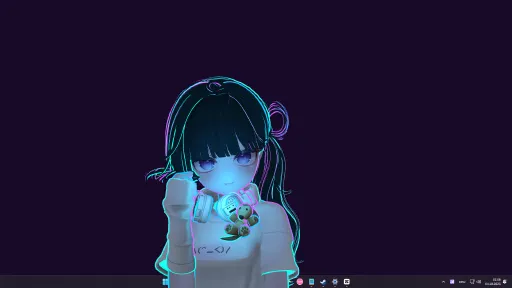
MateEngine is a lightweight, customizable desktop companion app that brings 3D anime-style characters to life on your screen. Built with VRM model support, it allows you to inject your own avatars and watch them interact, idle, and even dance—right from your desktop.
This project is a alternative aimed at giving users more control and flexibility without relying on expensive model packs or locked-down systems. Whether you want a simple virtual presence or a more animated character hanging out while you work, MateEngine is designed to be approachable and performance-friendly.
VRM Models / Frequently Asked Question
Important: This app includes the default model "Zome." Hatsune Miku is not included.
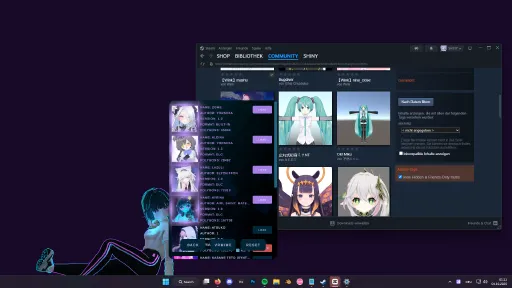
To use custom models, you must download them from websites that offer .vrm files, or commission artists who create or convert models to the VRM format.
I am not responsible for the quality of third-party models. If you experience clipping or similar issues, the model's author is responsible, not this app.
RELAXE ON WINDOWS
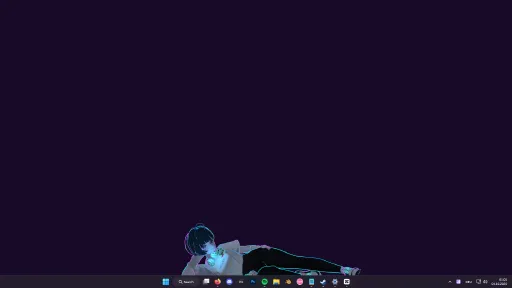
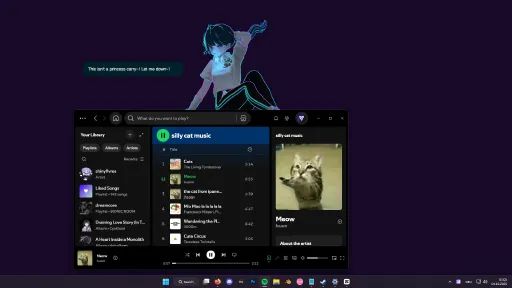
Drag your pet onto a window and it will relax on top! Perfect for watching videos she'll watch with you. Or let her quietly spy while you do your homework, hehe.
This feature is experimental and not fully developed. Please avoid using it with apps that have anti-cheat protection enabled.
DANCING
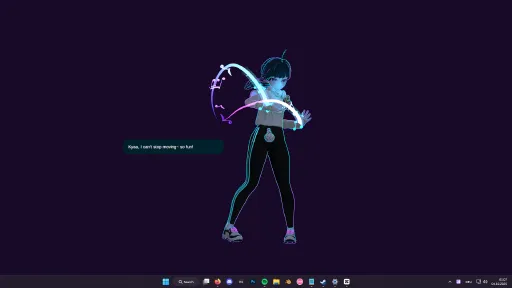
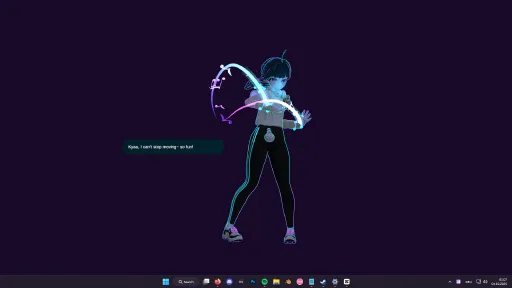
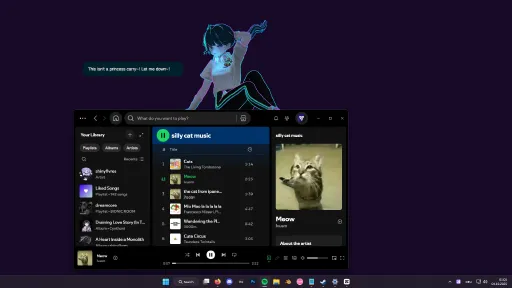
She will start dancing when you play music! You can decide which apps are allowed to trigger dancing.
Open the Options menu, go to the audio sources, and whitelist your music apps.
Tip: Start the music app first (e.g. Spotify), then open the menu and add it to the source list!
HEAD AND SPINE MOVEMENT
Not just the head — her eyes, head, and spine all follow your mouse cursor!
This makes the movement look smooth and natural compared to other desktop pets.
HAND MOVEMENT
Careful! Sometimes she’ll try to grab your mouse — hehe!
Move your cursor near her hands or arms and watch her try to catch it!
TOUCH REGIONS
Hover your mouse over sensitive areas like the head or belly to trigger cute gestures!
For example, hovering over her head makes her giggle and spawn sparkle effects, making her feel comfy.
CHATTING
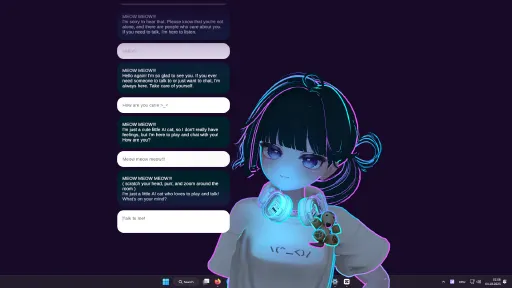
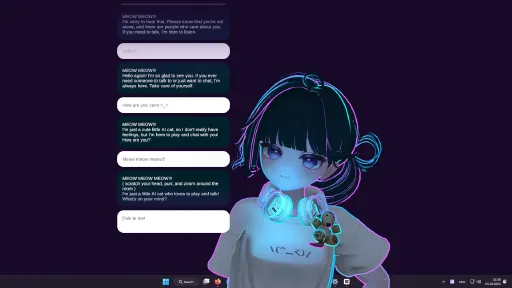
You can chat with your pet anytime! Just note that it’s a small, local AI with simple messages.
For more complex conversations, you can use mods with your own models and messages!
RELAXING
When you drag her to the taskbar, she’ll lay down and relax on a big candy macaron,
watching your mouse cursor with sleepy eyes.
DRAGGING
You can reposition her by clicking and dragging her with your mouse.
Just hold the button down and move her wherever you like!
CHIBI MODE
Hold your mouse over her feet for a few seconds and she’ll transform into a tiny,
adorable chibi version of herself — extra smol and cute!
CUSTOMIZATIONS
You can change her size, animation speed, language, and modes.
There are also graphics and FPS settings for low-end (potato) PCs!
DARK MODE
You can turn off lighting — perfect for VRM models with emissive textures!
Pair it with the glow/bloom toggle and your pet will shine like a diamond in the dark
MODDING
Modding is supported! Load your own VRM model by pressing the VRM button.
If your model doesn’t load, it’s likely corrupted or not exported correctly.
Make sure to export using the correct format:
VRM0.X: Uses MToon Shader
VRM1.X: Uses MToon10 Shader
Also make sure your model uses a proper humanoid bone setup.
MateEngine follows the official VRM loading specification, so model issues are not caused by the app.
How To Use
It’s easy! Just start MateEngine and you’ll be greeted by Zome.
Right-click Zome to open the Options menu — here you can change graphics, effects, audio, and choose which apps make the pet dance.
Tip: Start the sound app (e.g. Spotify) and play something before opening the menu, or it won’t appear in the sound source list. Then add it to the Danceability list and save.
Key Features
Idle Animations: 10 different idle animations for when the pet is relaxing on your desktop!
Drag Animation: 1 drag animation plays when you move your pet around the desktop.
Dance Animation: The pet dances when music plays on apps like Spotify, Chrome, and others!
Head Tracking: The pet follows your mouse with its head.
Eye Tracking: The pet's eyes also follow your mouse for extra detail!
Hand Tracking: When you hover your mouse near its hands, the pet will try to catch and hold it!
Head Pats: Hovering over the pet’s head makes it shake, jiggle, and spawn adorable heart particles.
Spine / Chest Tracking: Head, eye, and hand tracking aren’t enough! When you move the mouse, the pet will also move its upper body in that direction to make movement more realistic!
Chibi Mode: Hover over its feet for 3 seconds to transform the pet into a chibi version! Works with custom VRM models.
Sensitive Parts: The pet will react shyly and cover certain areas if you hover over them.
Custom VRM Support: Load any VRM using MToon shaders (UniVRM VRM0). VRM1.X (MToon10) support coming soon!
Particle Effects: Includes various particle effects, with more to come!
Auto-Load Custom VRM: Your custom model loads automatically on startup.
Performance
MateEngine is designed to be lightweight on CPU and GPU resources. RAM usage depends on your model’s complexity, especially texture sizes. For example, a high-res VRM model may use around 200MB of RAM. Simpler models use significantly less.
Animation transitions are smooth and fluid, providing a more natural experience compared to other apps in this space.
Planned Features (Upcoming Updates)
Menu color customization
Wallpaper Engine integration
Optional support for avatars sitting on windows or the taskbar
Known Limitations
Taskbar/window sitting is currently disabled to avoid triggering anti-cheat systems in certain games.
Community and Contributions
MateEngine is open-source. IIf you’re a developer or just curious about how it works, you're welcome to explore the project, contribute features, or build your own versions using Unity.
Screenshots
10 images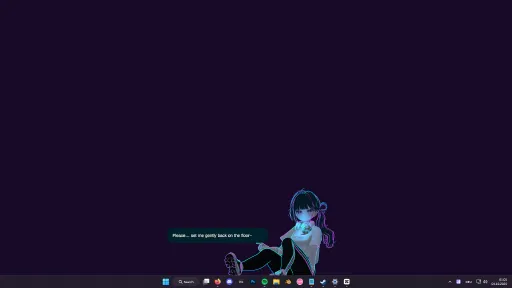
Version Information
Steam Patch Notes
Official update history
MateEngine X3.0-1 Patch
Fixed an issue where the avatar could clip into the taskbar when moved sideways quickly before sitting.
Fixed an issue where the avatar could clip into windows when moved sideways quickly before sitting.
Fixed an issue where the avatar could sink into windows or the taskbar when switching sitting positions rapidly.
Fixed an issue causing the MateEngine startup sound to play with a long delay.
MateEngine 2.6.0-2 – Performance Update
A new toggle called "Memory Optimization" has been added in the Debugging section (Open Settings and scroll down). When enabled, it reduces RAM usage by up to 60%. If you notice bugs, issues, or strange behavior, it’s recommended to turn this feature off. This option is mainly intended for systems with 8 GB of RAM or less. Users with 16 GB or more generally don’t need to enable it.
MateEngine 2.5.0-2 – The Finishing Update
Performance Update
Fixed an issue that caused slow boot times on the Steam version.
Improved startup speed by up to 2×, allowing MateEngine to launch much faster.
Added automatic mesh data optimization to reduce GPU usage. Note: User-generated content such as Workshop avatars may still perform worse than MateEngine’s original avatars.
VRMLoader Update
Added managed RAM allocation to minimize memory leaks when switching models frequently.
Reduced overall RAM usage to improve system stability.
Dance Player Update
Added smooth transitions between dances and animation states, including idle.
Improved transitions when switching dances for a more natural and fluid experience.
Note: A brief lag may still occur when switching dances, as audio and animation are loaded and unloaded from mod files to conserve memory.Dance Player is no longer available during the intro animation and becomes active only once the avatar enters the idle state.
Internal Changes
Reduced total script usage.
Removed redundant code to improve stability and overall performance.
MateEngine 2.4.4 - Patch 4
Changes:
Major performance boost when multiple mods are installed
Improved performance when handling many chatbot messages
Slight performance gain for Dance Player
Reworked internal code for overall optimization
Updated color theme options for better consistency
Fixed several issues with old color theme sliders that caused UI color glitches
Fixed performance issues on high-end PCs
Fixed loading issues with mods
Reduced load time for custom dances
MateEngine 2.4.2 - Patch 2
- Added Volume Slider to Dance Player
- Mod List is now scrollable
MateEngine 2.4.1 – Patch 1
* Fixed memory overload issues with Mods and Dance Mods
* Fixed face distortion caused by MMD blendshapes in the Dance Player
* Songs now automatically play the next track when the current one finishes
MateEngine 2.2.4-2 – Debugging Update
Debug Menu
Added a Debug Menu (open with F8) that displays nearly all internal parameters, including bools, ints, floats, and strings.
Includes advanced developer options to modify internal AI behavior and hidden engine variables. Use with caution — intended for modders and developers only.
Examples of what can be changed using Debug Settings:
Rotate the avatar
Scale the avatar beyond normal limits
Adjust individual X, Y, Z scale axes
Rotate along X, Y, Z axes
Modify texts and colors
Manipulate any component at runtime
Essentially, control almost everything normally locked from user access
You can enable auto-start for debugging to automatically load your saved Debug Settings profile.
Warning: Misuse may cause instability or break the software. If that happens, delete the MEValueChanger folder in AppData/LocalLow/Shinymoon to reset.
Fixes and Improvements
Fixed typo: “Context Lenght” → “Context Length”
Slightly improved AI streaming performance
Reduced AI response latency
Added partial integration of a custom Dynamic Bones build for future use in correcting skirt clipping on .ME models
MateEngine 1.9.6 Patch
New
Added clothing options for the official model Ayrina. You can now toggle certain accessories on and off.
Added 4 new cute animations to Big Screen Mode for more dynamic and natural movement.
Fixes
Fixed an issue where the official model Ayrina’s face animations did not work. She can now blink and use facial gestures.
Fixed an issue where the animation cycle could break when changing the transition time.
Fixed an issue where some models (only built-in / DLCs) could not be loaded.
UI Changes:
* Fixed: Radial Menu icon colors now display correctly when using custom color themes.
* Remove buttons in the Model menu are now always red, regardless of your color scheme.
* Added a 3-second confirmation timer to the Remove button to prevent accidental model or Steam Workshop deletions.
* Fixed: AI chat bubbles now use your selected menu color.
* Radial Menu now live-refreshes buttons when switching states (for example, from Idle to Macaroon or Dance), preventing accidental access to disabled features.
* Improved: Radial Menu separator is now a slightly transparent white for a cleaner look.
Macaroon Changes:
* Macaroon can now only be toggled via the Radial Menu; the "Drag + Right Click" hotkey has been removed.
Performance Improvements:
* Improved RAM handling when switching models.
* Fixed a memory leak that could increase RAM usage from around 300 MB to over 3 GB after many model swaps.
* Unused textures, meshes, and controllers are now properly unloaded.
* Best results with well-optimized VRM0.X, VRM1.X, and .ME files.
* Cleanup may not work with broken or poorly structured models.
Note:
A small memory leak may still occur after frequent model switching, especially when using poorly exported or low-quality user models. This is outside my control. If you notice RAM usage increasing after many swaps, simply restart MateEngine or stick to a single model. Also, using many mods increases initial memory usage, so keep your library to 4–10 models for best performance.
* Taskbar Sitting and Window Sitting now work correctly across all monitors and multi-monitor setups with different scales.
* Updated AI Model from **Qwen 2.5 (1.5b)** to **Qwen 3 (1.7b)** for improved performance and accuracy.
Model stuck when snapped to taskbar or window while sitting on Macaroon
https://github.com/shinyflvre/Mate-Engine/issues/129#issuecomment-2866979676
Font Size:
- Japanese
- Korean
- Chinese
Should now be readable again.
Small Fix:
- Scollbar works now in VRMMenu
Current Release
Build 24920588
Uploaded Sep 10, 2026
System Requirements
How to Install
MateEngineX.exe to play
Troubleshooting tips
• Run Redist/_CommonRedist installers if game won't start
• Add folder to Windows Defender exclusions
• Run as administrator
Download
Direct link available
Needed when extracting (WinRAR / 7-Zip) — not a site login.
49CC20DF
7115528c861c9ae03b026b5c52a4a0abde7fc9f3572257495959e5fac81671e8
You May Also Like
View All

Download MateEngine for PC with a direct link or via torrent. Get the full version of MateEngine for free. MateEngine is a Animation & Modeling released by Shinyflvres.