





About the Game
18,490 Bricks. One Small Town to Put Back Together.
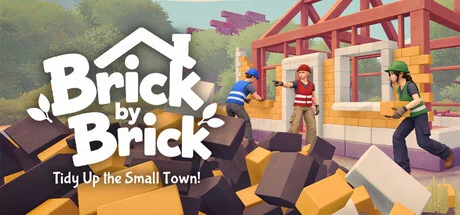
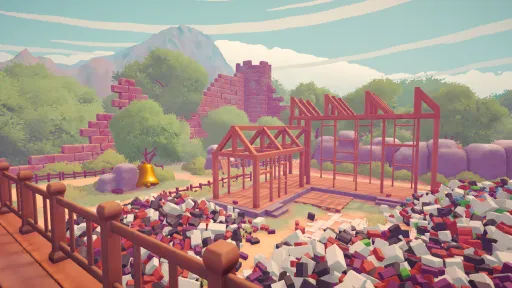
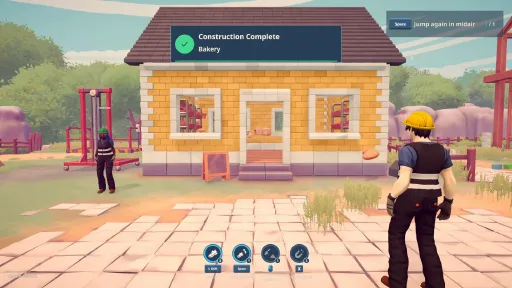
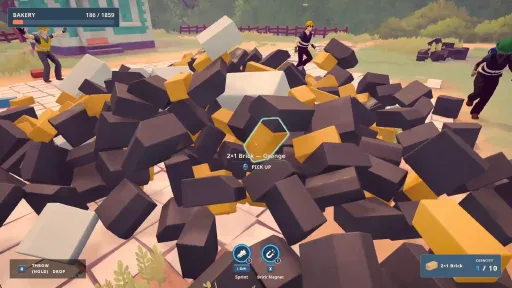
A little town is waiting to be put back together. Collect, sort, and place 18,490 bricks in a relaxing first-person tidy-up game, solo or in online co-op with up to 5 players. Turn scattered pieces into buildings, and watch your work bring the town to life.
COLLECT, SORT, AND BUILD
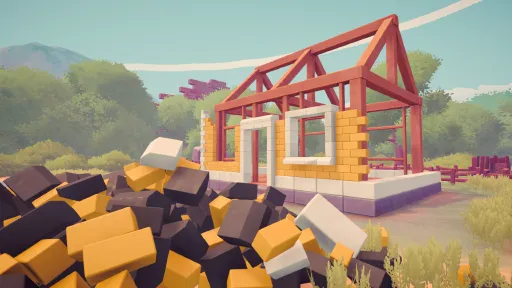
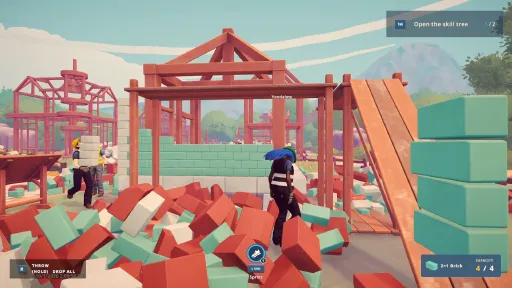
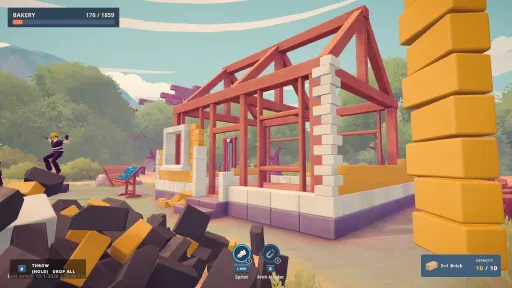
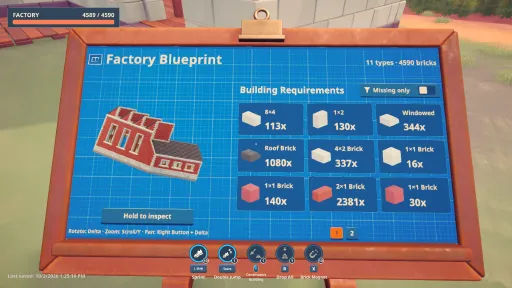
Find the bricks you need by their shape and color. Follow each building’s plan and place the pieces in the right spots. Watch the piles get smaller as the walls grow taller.
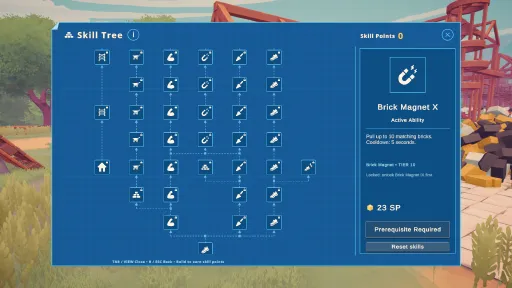
UNLOCK ABILITIES
Unlock helpful abilities to make the work easier. Use a magnet to collect bricks, a wheelbarrow to carry them, and scaffolding to reach higher places. Spend less time carrying and more time building.
WATCH THE TOWN CHANGE
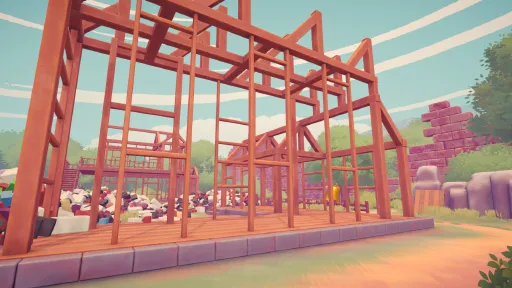
Turn piles of bricks into a cozy little town. Walk through the streets and enjoy the buildings you’ve finished. With every building you complete, there’s more to see.
One brick at a time. Better together.
Screenshots
10 images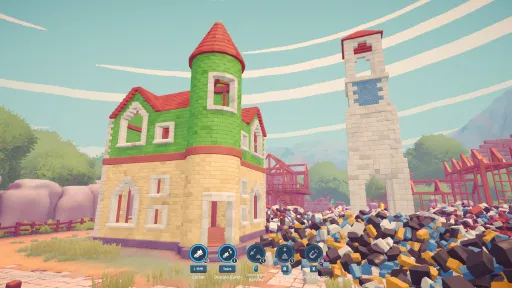
Version Information
Steam Patch Notes
Official update history
Castle Completion, Save & Achievement Hotfix
Hotfix - v1.6.2
This hotfix focuses on several issues that could block Castle completion, achievements, and save management, alongside improvements to placement targeting and diagnostic logging.
Castle Completion Fix
Fixed an overlapping 2×1 Plum block placement that could leave players with one block remaining and no visible space to place it.
Removed a hidden 2×2 roof tile inside a 4×4 roof corner that could prevent Castle completion.
Fixed an issue where completed sections could block selection of unfinished placements, including around tower–corner connections.
Updated the Castle’s block supply, blueprint counts, and completion requirements to match the corrected layout.
Existing Castle saves update automatically.
Your existing progress is preserved, including rewards, completion times, and previously completed runs.
You do not need to start over.
Final Brick Placement Improvements
Fixed an issue that could prevent players from placing the final bricks in a tower section.
Improved placement reach when targeting difficult gaps.
Improved targeting for spaces hidden behind already placed bricks.
Added visible outlines for valid placement targets hidden behind completed sections.
Black Cat Achievement Fix
Fixed an issue where rescuing the Black Cat could leave its achievement locked when:
Autosave was disabled.
Saving failed.
In multiplayer, rescuing the Black Cat now unlocks the achievement for all players currently in the session.
Save Slot Deletion Fixes
Fixed issues that could prevent save slots from being deleted.
Fixed cases where deleted slots could not be reused correctly.
Improved save protection when a deletion cannot be completed.
Added clearer diagnostic logging to help identify save deletion failures.
Single-Player Microphone & Diagnostics
Microphone capture is now disabled in single-player mode.
Improved diagnostic logging for crashes and freezes that occur after:
Pausing the game.
Returning from sleep or suspend.
Added additional logging to help investigate these issues on Steam Deck.
When submitting in-game feedback, selecting Include Logs now also includes records from the previous game session.
Thank you for continuing to send us your reports and feedback.
If you were blocked from completing the Castle because of the final remaining block, your existing save should update automatically after installing this hotfix no restart is required.
Town Save Loading & Recovery Hotfix
Hotfix - v1.6.1
This hotfix addresses Town save loading issues affecting some older saves after Update v1.6.0, including saves that could freeze, show a black screen, display 0%, or fail to load.
We’ve added automatic save repair, new recovery tools, and additional protections to help preserve existing progress.
Town Save Loading & Automatic Repair
Added automatic repair for loose bricks with invalid positions or movement speeds.
Correctly placed bricks remain preserved.
The repair runs automatically when loading an affected Town save.
Improved protection against corrupted or invalid loose brick data preventing a save from loading.
Save Recovery
Added Recover Save options for both:
Singleplayer Town saves
Multiplayer Town saves
If a save still shows 0%, freezes, or does not load normally, you can now inspect available recovery copies and restore one directly from the save menu.
How to Recover Your Save
First, try loading your save normally. The new repair system runs automatically.
If the save still shows 0% or does not load:
Open Town → Singleplayer or Town → Multiplayer.
Select Recover Save on the affected save slot.
Review the available copies and check their date and progress.
Select Use This Copy on the version you want to restore.
Your original copies are preserved during the recovery process.
A save displaying 0% does not necessarily mean your progress is lost. Recovery depends on the remaining data available in your save files and backups.
Safer Save Backups
Improved backup handling for Town saves.
Added additional protection against failed loads overwriting existing progress.
Recovery operations preserve original copies instead of immediately replacing them.
Improved handling of backup copies when recovering older saves.
Voice Chat Optimization
Improved voice chat efficiency.
Microphone capture and audio processing now stop completely when Voice Chat is disabled.
Reduced repeated voice chat warnings during frame rate drops.
Reduced unnecessary logging related to voice chat.
If you experienced Town save loading problems after v1.6.0, please try loading your save normally first. If that does not work, use the new Recover Save option.
Thank you for your reports and patience while we worked on this hotfix.
Brick Recovery & Multiplayer Loading Hotfix
Hotfix - v1.2.1
- Fixed floating and frozen bricks in existing saves.
- Improved multiplayer loading to prevent misplaced bricks and invisible obstacles.
- Fixed brick removal range and improved removal priority for misplaced bricks.
- Added Wheelbarrow turning while stationary.
- Building Replays now only keep the current session to reduce loading times and save sizes.
- Existing saves and progress are preserved.
Thanks for your reports!
Multiplayer Stability, Building Replay & Wheelbarrow Improvements Update
Update - v1.2.0
This update focuses heavily on multiplayer stability, connection reliability, saving, and synchronization, while also expanding Building Replays, improving Wheelbarrows, and fixing several gameplay issues.
Multiplayer Stability & Connection Improvements
Improved network message handling and connection cleanup to address potential causes of multiplayer disconnects.
Temporary Steam lobby data issues no longer unnecessarily close an active multiplayer session.
Improved Steam lobby creation reliability.
Improved connection retries when the host is temporarily unreachable.
Adjusted synchronization of large worlds to reduce network congestion when players join.
Reduced unnecessary network traffic when multiple players use scaffolding.
Prevented new connection attempts from starting while the game is closing.
Improved network cleanup during game shutdown.
Save Reliability & Performance
Optimized save preparation to reduce gameplay hitches.
Improved overall save reliability.
Fixed an issue where leftover save-file cleanup could incorrectly report a successful save as failed.
Improved handling of final saves when closing the game.
Optimized timelapse processing to reduce performance spikes during gameplay.
Building Replay Improvements
Building Replays now save their full photo history between sessions.
Added a slider for browsing through replay photos.
Improved camera and timelapse capture when:
Minimizing the game
Using Alt+Tab
Restoring the game window
Brick Recovery Fixes
Fixed loose bricks becoming trapped inside or underneath completed buildings.
Improved section-completion timing when bricks were still finishing their placement.
Wheelbarrow Improvements
Added bulk loading into Wheelbarrows using the existing bulk-drop ability.
Added a hold-to-load interaction hint when looking at a Wheelbarrow.
Improved Wheelbarrow turning.
Improved Wheelbarrow controller controls:
Left Stick: Move
Right Stick: Steer
Controls, UI & Customization
Improved Blueprint readability when using higher FOV settings.
Added new pink customization options.
Ending Sequence Improvements
Improved the ending sequence when player appearances load late.
Improved handling when participants leave the multiplayer session during the ending sequence.
Window & Stability Improvements
Improved minimize, Alt+Tab, and window restoration handling.
Added safer handling for camera and timelapse capture during window state changes.
Improved shutdown handling for:
Final saves
Network cleanup
Diagnostic reporting
Added more detailed connection and window-state diagnostics to help investigate remaining stability issues.
Added limits to diagnostic logging to prevent excessive log generation.
Prevented diagnostic initialization failures from interrupting game startup.
Thanks for all your reports and feedback! We’ll continue improving Brick By Brick: Tidy Up The Small Town! with future updates.
[dynamiclink href="https://store.steampowered.com/bundle/91333/Brick_by_Brick_x_Deep_Blue_Sushi/"][dynamiclink href="https://store.steampowered.com/bundle/91334/Brick_by_Brick_x_Toy_Shop/"][dynamiclink href="https://store.steampowered.com/bundle/85192/PaperPixel_Games_Support_Bundle_3/"]
- Fixed an issue where selecting Brazilian Portuguese, European Portuguese, or Latin American Spanish caused the game to display English instead.
Controls, Magnet & Hand Cart Improvements Update
Update - v1.1.0
This update expands control and keybinding customization, improves Magnet, wheelbarrow, and hand cart interactions, fixes several brick-related issues, and optimizes construction timelapses.
Brick Recovery Fixes
Removed an unintended placement spot near the Tower where bricks could become permanently trapped.
Bricks already stuck in this location in existing saves are now automatically restored to their original spawn positions when loading the save.
No new save is required.
Controls & Keybinding Improvements
Added previously missing controls to Settings, including:
T — Emote
F — Vehicle Reset
Z — Ping
And additional gameplay actions.
Expanded keybinding customization for:
Mouse controls
Gamepad controls
Alternate movement bindings
Alternate crouch bindings
Improved keybinding conflict handling.
Improved gamepad button swapping.
Fixed rebinding behavior for actions that share the same button in different gameplay contexts.
Integrated the new bindings with saved settings.
Added proper category-specific Reset to Defaults support for the new bindings.
Fixed an issue preventing gamepad controls from being rebound when no keyboard was connected.
Improved cancellation while rebinding controls.
Improved behavior when closing Settings during a rebind.
Improved handling of keyboards being connected or disconnected during rebinding.
Improved switching between keyboard and controller to prevent unwanted player movement.
Magnet & Wheelbarrow Improvements
The Magnet can now collect matching bricks directly from wheelbarrows.
Magnet collection correctly respects:
Brick type
Brick color
Player carrying capacity
Magnet upgrades
Fixed an issue where a failed wheelbarrow pickup could leave a duplicate brick visual in the world.
Hand Cart Improvements
Improved Hand Cart loading reliability.
Fixed continuous loading getting stuck after a failed loading attempt.
Fixed quick Drop button presses sometimes being interpreted as a full unload during lag.
Improved handling when dropping bricks near a Hand Cart.
Construction Optimizations
Optimized construction timelapses to reduce performance overhead.
Timelapse image quality remains unchanged.
Thanks for all your reports and feedback!
[dynamiclink href="https://store.steampowered.com/bundle/91333/Brick_by_Brick_x_Deep_Blue_Sushi/"][dynamiclink href="https://store.steampowered.com/bundle/91334/Brick_by_Brick_x_Toy_Shop/"][dynamiclink href="https://store.steampowered.com/bundle/85192/PaperPixel_Games_Support_Bundle_3/"]
Achievement Reliability Update
Update - v1.0.1
Improved achievement reliability.
Fixed multiplayer issues that could prevent some achievements from unlocking correctly.
Thanks for your reports and feedback!
Current Release
Build 26536692
Uploaded Nov 09, 2026
System Requirements
How to Install
BrickByBrick.exe to play
Troubleshooting tips
• Run Redist/_CommonRedist installers if game won't start
• Add folder to Windows Defender exclusions
• Run as administrator
Download
Direct link available
Needed when extracting (WinRAR / 7-Zip) — not a site login.
0B6199F9
ee71188d65fc8131d247be3bac2f3ec0f785617b63fc7a294dfc08367c3f0ca9
You May Also Like
View All








Download Brick by Brick: Tidy Up the Small Town! for PC with a direct link or via torrent. Get the full version of Brick by Brick: Tidy Up the Small Town! for free. Brick by Brick: Tidy Up the Small Town! is a Casual released by PaperPixel Games.