





About the Game
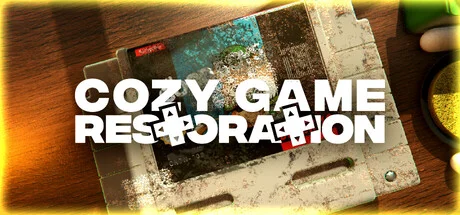
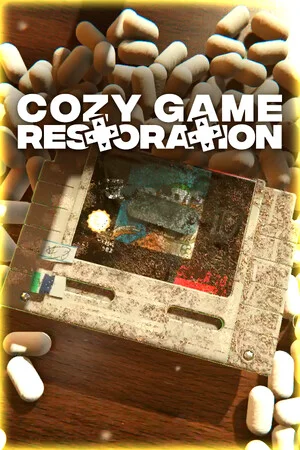
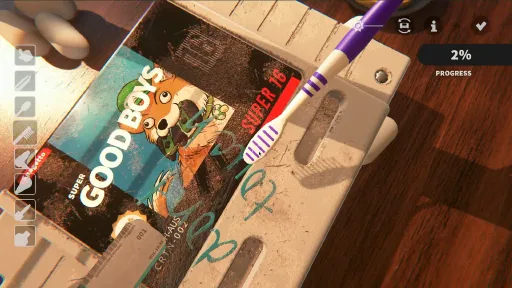
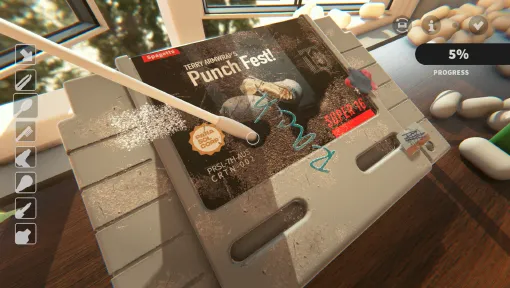
Cozy Game Restoration is about the quiet satisfaction of restoring something that matters. You’ll unwrap carefully sealed packages to discover old, battered video game cartridges. They'll be covered in stickers, markers, dust, and all the accumulation of time. Each one is different, flawed in its own way, and waiting to be brought back to life.
RESTORE FORGOTTEN RETRO GAMES
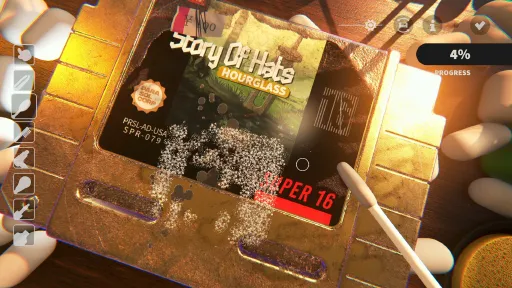
Every cartridge is procedurally dirtied. Some have clean labels but cracked shells. Others are scuffed, drawn on, or covered in adhesive residue. Grime is layered. Dust, ink, discoloration, stickers, and scratches each require a different tool to remove. Surfaces stretch, smear, and lift as you work. It’s slow, tactile, and satisfying.
LOOT BOXES BUT IN A GOOD WAY
Game cartridges will arrive inside mystery parcels sealed with tape. You’ll peel them open by hand, lifting the flaps, and wrestling with sticky tape to see what’s inside. Each game has randomized conditions and visuals, with 108 distinct titles inspired by classics from the 1980s to early 2000s.
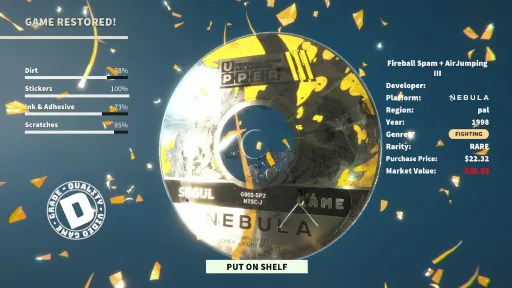
Some are common finds, but others can be much rarer. You’ll encounter regional variants of carts, sticker artwork, and even shells made of gold (or better). Every game you restore will bring you closer to completing your collection, and there’s always a chance something unexpected will show up.
COMPLETE YOUR COLLECTION
As you restore games, you’ll complete collection-based quests. This might be simple stuff like “collect three puzzle games”, or “two rare platformers”, but you’ll also see more unique things which work with the game’s in-game calendar like “Have 4 sci-fi games on your game shelf on November 7”.
Each finished quest will reward you with a gift. Inside will be a decoration or cosmetic for your collection room that you can use to make it a little more personal.
BUILT FOR THE FEELING
There’s no timer and no fail state in this game, but that doesn’t mean it's a shallow experience. There’s a deep set of interwoven systems which keeps gameplay varied and interesting, all whilst respecting the quiet chill vibes of a cleaning game.
If you’ve ever carefully peeled a sticker, dug through 2nd hand store games for a rare gem, or reminisced about your old collection, this is for you.
The game runs great on desktop, but it is being built from the ground up for Steam Deck. I’m planning on making this performant on a pretty wide range of systems.
Screenshots
9 images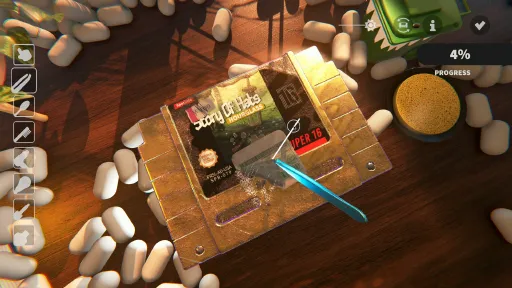
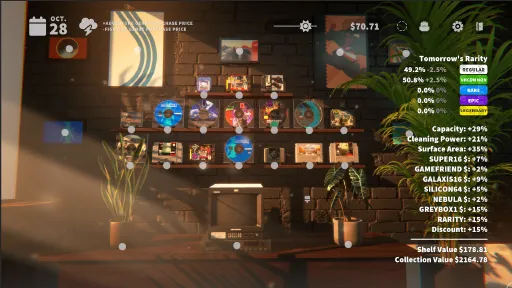
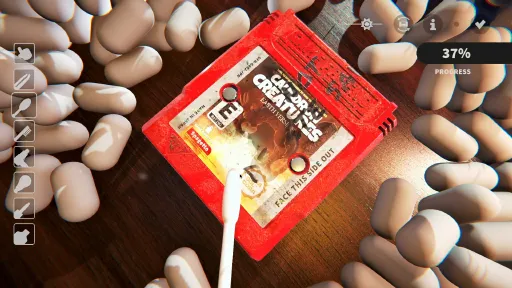
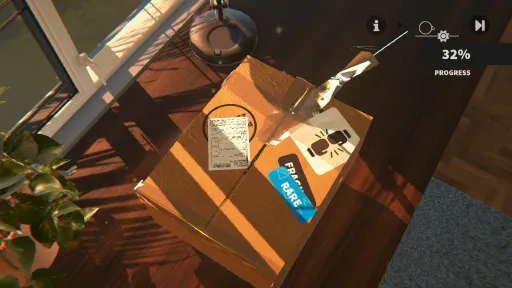
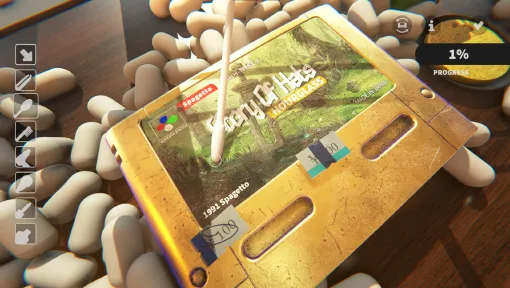
Version Information
Steam Patch Notes
Official update history
Patch 1 notes
First patch is out! This adds the following languages:
- Russian
- Bulgarian
- Hungarian
- Norwegian
- Ukrainian
- Turkish
I've also fixed a few QOL bugs, but there's more to come:
- Fixed Adhesive not spawning on discs when removing stickers
- Fixed some tutorial text which wasn't localising
- Removed arrows and page turn elements from the upgrade menu which didn't have more pages on it yet
- Reworked credits with additional localizers (thank you!)
Thanks to everyone for reporting these issues! I've got a bunch i'll be working through over the weekend too :D
Hello!
Lots of final changes are coming in, and i'm trying to keep the demo as updates as possible as bugs are fixed and polish goes in on the main game.
For this update (and the last one i didn't actually make a post about), here's teh cliff notes:
Localisation is in with all Tier 1 languages + some more:
English
French
Italian
German
Japanese
Korean
Chinese (simplified)
Chinese (Traditional)
Polish
Portuguese - Brazil
Dutch
Belarusian
Catalan
Czech
Spanish - Latin America (this is labelled as MX in language settings)
The game will attempt to localise automatically on boot but you can access the language menu by clicking on the little Gear icon at any time.
Also a MASSIVE Thank you to everyone who has helped with localising the game!
Autocomplete
Autocomplete will now kick in when all layers (dirt, ink, scratches, stickers) are at 99% or higher
This prevents the jump scare that was happening with the previous system that was just kicking in when the average of all your cleaning hit 99.5%, which usually meant there was a bit of dirt left over on the cart.
Also, this is toggle-able so if this isn't your thing, you can disable autocomplete in Accessibility
More starting Cash
Some users have reported not being able to buy everything if they unlock slots, so i've upped the default money available in game. I'll be resetting saves in the full game because the rarity of games you have in the demo are more mid-late game, so there's no real problem providing extra cash :)
Cheers and thank you everyone for the feedback!
-Adam
Hello!
Patch 4 already! Thanks for all the reports and discussions on the changes. I feel like i've got a lid on most of the big stuff now. Fingers crossed :D
Changes
Reworked placement of furniture on the customisation screen - this is a fix to try to stamp out an issue where some players could place games on the walls, plants on the shelves, and dupe games, which kinda broke the game
Locked down upgrades because they steal all your money and its very hard to make money in the demo. YOu'll see upgrades at like $9999 now. that's just to prevent you spending the demo money on upgrades instead of games
Screen scaling updates
Fixes to screens where you attempt to delete save and the popups were not appearing
Tutorial is now split up so you can finish the cleaning of the game separately to the customise collection room. i also show you the how to play screen
Known issues remaining
More localisation + language selection menu
furniture rotation
Windowed mode toggle is buggy for some players
Autocomplete is still disabled
But i have a new approach i want to try which will probably appear in the next patch.
Cheers, and thanks again for the feedback!
Adam
Hello!
A few big changes and some fixes to sneaky bugs which popped up.
Biggest fix - Localisation characters are now showing
Non english characters were not being built properly and were showing up as pink squares. this has been fixed. Thank you for those who raised this!
this is what it used to look like when using Japanese locale
[img src="{STEAM_CLAN_IMAGE}/45621034/cfb98510ce8cbd61e140c0bf58d7b35eb893cff5.png"]
what it looks like now (hooray)
[img src="{STEAM_CLAN_IMAGE}/45621034/94dd1c40b18a19b80156d70cae9a38c5779934cb.png"]
Smaller QOL fixes
Sometimes the little popup previews for games would appear over the cursor, which would block the ability to click. This is now fixed that the hover should never be able to interfere with clicking again
Game tutorial popping up twice issue fixed. If you'd exited the game cleaning without going to the game room and finishing that too, the tutorial wouldn't be set as complete, so the next game you cleaned would pop up the tutorial again. this is now split up into 2 tutorials, so finsihing the first tutorial will tell the game not to show that again. The collection room also now has a popup showing more info on how the game room works at the end too
Moved the close button on the booklets to the tab menu. It was disappearing on some people's machines and I think it might be related to how the positioning is calculated. to simplify it's been put at the end of the tabs, which should fix that issue.
Added Localisation to the load slots menu
Changed Toro 2 epic cart PAL to NTSC because the ridges on the game at epic rarity are quite hard to get into with the tool strengths you have in the demo. Since epics are usually for mid game where you've had more time to make your shelf bonuses and buff your cleaning tools, its kinda demo specific.
Broke and unbroke the 'highlight game in booklet when you clean them'
Thanks for the feedback and taking the time to post!
Whats on my radar now:
People can drag decorations to slots they should not be able to
Some people and also duplicate things
More localisation
Langauge selection menu
Options screen on main menu
I'm still trying to replicate the decorations bug on my side but i'll keep poking at it
Hello! Thanks for the feedback so far on the demo!
I pushed an update last night and about 30 mins ago. Here's what changed:
Autocomplete was OP so i've disabled it for now
CD Scratches were not OP enough so i have buffed them. You should see the percentage calcs care more about these now
The Super16 cart wasn't fading the UV glow when it was highlighted. Now it does
All menus now use the same booklet. And there's a consolidated top bar with all that in there
Known issues i'm digging into
There's been a couple of Linux specific bugs about buttons disappearing that is straight up voodoo magic. There's nothing special about these buttons so if this happens to you, please let me know so i can get more clues :D
Localisation is missing on some menus. Working through that!
More languages coming. Thanks to the community translation peeps! If you'd like to help out, you can do so here: localisation sheet! (please don't just google translate or AI this)
More square Aspect Ratios can cause cropping issues on the booklet
The tutorial can bug out if you don't go to the collection room first and complete that. in that situation the game is all "oh you need to to the tutorial again"
Cheers!
Adam
Demo Patch 4 is up!
This is more of a quality of life patch with a focus on smooshin bugs and silly decisions i made with buttons and mapping. Mostly minor mid-clean fixes.
TLDR
Added Hotkey for continuous cleaning for both controller and keyboards
TAB on keyboard, or Square on Controller (Xbox X)
Flipped W/S From zoom to panning.
Now WASD is panning. And Shift + W/S is zoom. You can also use + - to zoom
Fixed pause so game pauses in background during menu screen and you can't wreak havok in the background when playing with volume sliders
Fixed UI buttons so you don't accidentally activate tools when pressing menu items (yaaaayy this was super annoying for me too)
Hotkeys for the controller - dpad up and down for cycling tools
cycle back and forth between tools on keyboard with z key
other stuff i cannot remember
New mappings:
( i have just discovered padcrafter for layouts omg )
[img src="{STEAM_CLAN_IMAGE}/45621034/880e4607bd8eef4da992afebcd656010d4155110.png"]
[img src="{STEAM_CLAN_IMAGE}/45621034/b67b5b0ceea4f068aab5f723aed751d03b044fa0.png"]
I'll be probably overhauling this and tuning a bunch of different mappings before launch, so please treat this as v1 atm.
Demo Patch 3 is live!
Thanks a ton for the feedback and reviews over the last week. It's helped me rethink some of the systems i thought were good enough for a demo, or just wasn't on my radar atm.
TLDR patch notes:
Tool toggle press is in more places in the game
was just in options before but it's also in ingame options. If its still reported as hard to find i'm going to maybe add a button on the hud
Volume and Audio
Master Volume added
Music Volume added
Tons of audio polish and tweaks
Audio changes when opening/closing window
Bin-osaur makes noises when eating packing peanuts
In game options menu added (yaaaayy!)
Clearer 'save and quit' button on the options menu
Input settings on options menu so you can enable and disable toggle press
options for audio too.
basically all the normal stuff you'd expect. The only thing I wont be adding is resolution setting because of some spicy ui resizing issues mid-scene
Box Tape rework
Scrapped the force-based tweezer system to see if a more chaotic wrapping paper style feel would be better.
Add HairDryer mechanic for heating up stickers to make them easier to remove
Add interactable Radio
This is a first pass that i'll be adding to with proper button pressing etc
Add Dirt and Ink stats when UV tool is active for more detailed information
other QOL stuff i can't remember right now
Next fest high level fixes on my radar
I also figure it'd be nice to share what i'm looking into atm.
Aside from the volume and toggle press stuff, the onboarding is what's missing most. I was hoping the tooltips would be okay but i was very wrong here ːsteamfacepalmː
Over the next couple of days i'l be aiming to push QOL changes to onboarding but it'll probably be one of those things that popup for first time players without a save file. but i'll cross that bridge of how to introduce it when i get there,
Other stuff i'll be looking at adding:
WASD rework to make panning default W/S instead of zoom
more labels on buttons for hotkeys
tool quick switching
light lag on uv light switching so there's a couple of extra seconds of light when you turn off the torch
better UI raycast blocking so you don't accidentally interact with the carts when working with menu overlays (like rorating carts, using options etc.
Okay here's more details on the changes
There's a new ingame menu now, and you can access it in game by pressing this little button below:
[img src="{STEAM_CLAN_IMAGE}/45621034/edc404297ffc5e82f28575a261247da1981a873b.jpg"]
Inside is options for input, audio and more ways to exit the game.
For audio, master audio slider will control everything, and Music volume will just deal with music tracks in game. When you toggle the radio it'll cycle between muted and the volume of your music settings.
[img src="{STEAM_CLAN_IMAGE}/45621034/c4307b63d59e572f994cfb252401616d92eb5134.jpg"]
You can also open and close windows and the audio will change. use the little hand tool to interact with stuff. You can mess with the lamp, turn the new radio on and off, open windows and move the cart around / rotate it.
[img src="{STEAM_CLAN_IMAGE}/45621034/b591e7a8d83a3f3d2bea0369ccc83f6ec72afcba.gif"]
Box Tape has been reworked to a more chaotic approach, and the tweezers which i heard more feedback than i thought i would are gone. its pretty much impossible to get stuck here now but please let me know if you have issues!
[img src="{STEAM_CLAN_IMAGE}/45621034/66d861100911169d23bfd29b47bd3766e42e4c5f.gif"]
You can be as slow or as quick as you want now too!
Hair Dryer now can heat stickers, which will make sticker removal much easier and will make it easier to peel without triggering adhesive gunk.
[img src="{STEAM_CLAN_IMAGE}/45621034/09a9902481b04cceddf1b5a2f231321ff67ffd95.gif"]
And finally the uv light will show the breakdown of what the different stats for the cart when active. I'll probably iterate on this so there's additional details when the torch is focusing on specific components i the future but it needs a bit of testing imo
[img src="{STEAM_CLAN_IMAGE}/45621034/137c048964fed0d7c6d435fcf0a5f4dd452b3077.jpg"]
Thanks again for all the reviews and comments!
Adam
Demo Update 2
This is the last of the critical stuff i wanted to jump on ASAP. The future stuff will be additional content and quality of life stuff :)
Pan now works as expected on Deck / Controllers
The Pan toggle (L1) was bugged on the previous build and would try to Pan + rotate at the same time, resulting in you just seeing the camera panning.
This is now working as expected on SteamDeck and all controllers. I've tested on DualSense and the LCD SteamDeck.
Windowed Mode!
I test ALL the time in windowed mode, and a few people have mentioned that it's their preferred way to play. This is now a setting in the Options menu.
Also the options menu isnt' hiding itself when you click a menu and generally makes more sense.
[img src="{STEAM_CLAN_IMAGE}/45621034/eb63f725147fea7b9fdbd0e83aaf954656ae3529.png"]its in a window woo!
Resolution reworked
There was an issue where the game would resize the game to the known resolution before checking what resolution was available. And because the monitor in fullscreen is changing resolution, it would decide that the highest resolution it could get would be the current resolution.
So you had a kinda race to the bottom of resolution which was horrid.
I've re-written the resolution management flow to sidestep those weird race conditions and now it just does what it's told to. It also made the windowed mode easier so yaaay
Quality of Life improvements
Solvent and Polish no longer also paints the back of CDs
FIxed collision with the Solvent/Polish so if you wet one side it no longer also paints the other side of the disc
Ending Clean message improved
Some people have asked if you can exit the game early and return. This was always intended but i think the words "COMPLETE CLEAN" felt very final, so i've reworded that message and provided a note saying you can return
[img src="{STEAM_CLAN_IMAGE}/45621034/e218d41e414e0fa1e847a43c277e7823b004b843.png"]
I'm pretty sure i did some other tweaks but those are the main ones!
Thanks for reporting these and playing!
-Adam
Demo patch 1
Whilst this demo is up I'll be patching and polishing stuff that either isn't working as expected, or that are causing trouble. To raise stuff, you can either pop into the discord or post here.
Stickers fixes
Some stickers were being spawned completely off the silicon64 carts, which meant that you couldn't hit 100% cleans. If you've had one of these carts that have decided to spawn with that sticker, the game will replace this with a new sticker now.
(Stickers won't be spawning off cart now too)
[img src="{STEAM_CLAN_IMAGE}/45621034/5e81d60dde02532bc09efe3c07fd9f9d66b2a8bb.jpg"]Stickers! yaaay!
Teleporting camera into the carpet fix
A camera math problem was triggering during the unboxing scene causing the camera to invert and look at the game from under the carpet.
I'm like 80% i've fixed this but will be keeping an eye on it
Thanks for raising these issues and for playing the demo! The game is better because of it :)
-Adam
Current Release
Build 26480077
Uploaded Nov 06, 2026
System Requirements
How to Install
CozyGameRestoration.exe to play
Troubleshooting tips
• Run Redist/_CommonRedist installers if game won't start
• Add folder to Windows Defender exclusions
• Run as administrator
Download
Direct link available
Needed when extracting (WinRAR / 7-Zip) — not a site login.
You May Also Like
View All








Download Cozy Game Restoration for PC with a direct link or via torrent. Get the full version of Cozy Game Restoration for free. Cozy Game Restoration is a Casual released by Parasol Corp.