








About the Game
You are the controller.
Radar Identified puts you in command of the upper airspace — the invisible high-altitude highways where hundreds of aircraft cross the continent every hour. Your job: keep them separated, keep them flowing, and get every flight where it needs to go.
Built by real-world air traffic controllers and pilots who wanted a simulation that gets the details right — proper phraseology, realistic climb and descent profiles, trajectory-based conflict prediction, and authentic sector procedures.
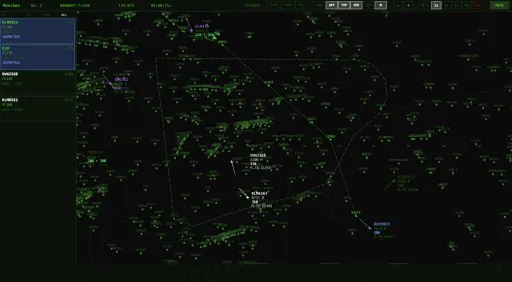
This is not a tower game — just a radar scope, flight strips, and the constant hum of radio traffic. You are the en-route controller: guiding aircraft between sectors, sequencing descents into the major airports, and resolving conflicts at 37,000 feet.
Realistic en-route ATC
- Real waypoints, airways and sector boundaries based on real-world ATC procedures
- ICAO standard phraseology — readbacks, callsigns and proper radio communication
- Flight-level management with the semi-circular rule
- Layered conflict tools — STCA (short-term alert), MTCD (medium-term, cleared-level trajectories) and a tactical sector-conflict planner to test your plan before you act
- Inter-sector coordination — landline calls and handoffs to neighbouring sectors and lower airspace
- Emergencies and restricted airspace that reshape your sector on the fly
- Dynamic weather — wind affecting groundspeed, plus storms and weather deviation
- Authentic airline callsigns and aircraft types — from Lufthansa A320s to Emirates A380s
Hear the frequency
- Offline ATC radio voices — pilots and controllers actually speak, with realistic readbacks and the busy chatter of a live frequency
- Voice control (beta) — issue your clearances by speaking, just like the real thing
German airspace: 5 playable sectors
- München (EDMM) — heavy international traffic mixing long-haul heavies with European carriers
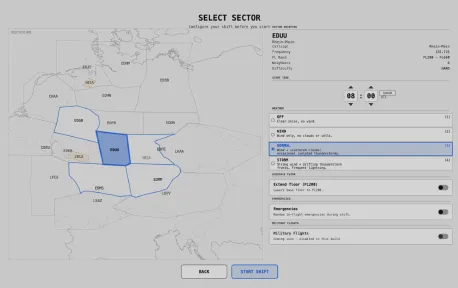
- Rhein-Main (EDUU) — busy, compact sector with converging routes around Frankfurt
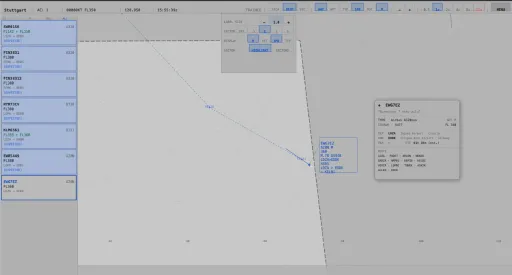
- Stuttgart (EDMS) — south-west sector close to France and Switzerland
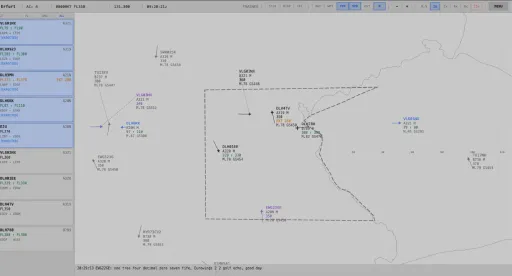
- Erfurt (EDFE) — gateway to eastern Europe
- Gladbach (EDGB) — north-west sector reaching down toward the Dutch and Belgian border
North America: 4 playable US sectors —
Cross the Atlantic and work the US Northeast — Boston, North New York, Athens and Rochester — with authentic FAA phraseology ("climb and maintain", "descend and maintain", and more) and a different control culture from Europe.
Your tools
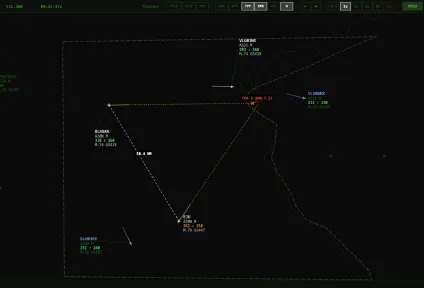
- Radar scope — aircraft blips with data tags showing callsign, flight level, speed and destination
- Flight strips — accept, manage and hand off every aircraft
- Radial menu — quick flight-level changes, heading vectors and direct-to clearances
- Command line — type ATC commands directly for faster control
- Time control — speed up the quiet periods, pause to plan your strategy
Learn at your own pace
A full handbook with guided, hands-on lessons takes you from accepting your first aircraft to resolving head-on conflicts. No prior ATC knowledge required — and if you're an ATC-sim veteran, you'll feel right at home. Otherwise watch our videos on youtube!
Early Access
Radar Identified is in active development and improving fast. Expect new sectors, deeper voice features and more — shaped together with the community.
Screenshots
6 images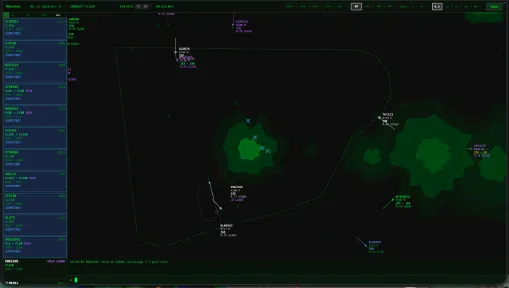
Version Information
Steam Patch Notes
Official update history
A quick round of fixes, almost all of them from your reports. Thanks for the detailed write-ups and screenshots — several of these turned out to have a different cause than it looked from the outside, and the extra detail is what made them findable.
Radar & clearances
- Revising a climb no longer reads back as a descent. Clear an aircraft to FL360, change your mind and give FL350 while it is still passing FL286 — the pilot answered "Descending to flight level three five zero" although the new level was still well above them. The wording now follows the aircraft's actual altitude. The same mistake in reverse — a descending aircraft re-cleared higher reading back "Climbing" — is gone with it.
- The position trail no longer runs over the aircraft symbol. It starts one radar update behind the target, where it belongs.
-The clearance menu now opens as a list by default. Prefer the radial wheel? Settings → Controls → Order menu layout.
-Automatic label de-overlap is now off by default. It moved your labels around on its own. Turn it back on under Settings → Display if you liked it.
Sector selection
-Milano (LIMM) can be selected again. Clicking it picked one of the greyed-out neighbouring sectors instead — only a small patch in the south worked.
-The traffic setting is visible on smaller screens. On a 13-inch laptop the briefing column ran off the bottom of the window and the traffic selector was unreachable.
Weather panel
-Text no longer overlaps. A long cloud line ran into the temperature column next to it, and the two footer lines collided. Values that do not fit are now shortened — the full report is always readable in the raw METAR line above.
Sound
-The pause button pauses the music instead of starting the track over.
-In-game music moves on to the next track. It looped the same song forever.
-Your volume settings survive a restart. Music came back at half volume after every launch even with the slider at zero. Master volume was affected the same way.
Text & guides
- The replay message is in your language and says why there is nothing to show — a recording needs at least 30 seconds of play time.
-The voice guide follows its own rule. Two examples spelled a callsign as "twenty-five" while the section above asks you to read each digit on its own.
Keep them coming — the reports are what makes this list.
Happy controlling! ✈️
Big QOL update this time — here's what's new.
🌩️ Weather System Overhaul
Four weather modes to choose from: OFF, WIND, NORMAL and STORM. Thunderstorm cells now build, mature and decay realistically, and in STORM mode full squall lines of 60–180 NM sweep across multiple sectors. Pilots will request weather deviations when CBs are ahead, and you have a two-minute grace period to issue a vector before any penalty kicks in. AI traffic also routes around storms automatically with a 15 NM lookahead.
📻 Radio Status Badges
TX/RX indicators next to your active frequency. RX lights up green for the entire duration of a pilot transmission, TX flashes orange when you issue a command and stays lit while holding Ctrl as push-to-talk (not yet working). Small addition, but it makes it much easier to keep track of who's talking.
🏷️ Labels & UI Improvements
Aircraft on a vectored heading now show a purple HDG badge on both the radar label and the flight strip — visible across all states. The radio log is scrollable through the last 50 transmissions via mouse wheel, and system messages are hidden during normal sessions so you only see actual radio traffic.
📋 Detachable Flight Strips
If you have a second monitor, you can pop out the strip panel into its own window. It remembers position and size across sessions and validates against connected displays, so unplugging a monitor won't break anything. Dock it back anytime with one click or Ctrl+Shift+D.
📏 Measurement Tools
Working DIST button in the toolbar — click and drag to measure distances in NM directly on the radar (hotkey D). The measurement stays visible after mouse-up so you can reference it while issuing vectors. The vector tool (VEC) now also has a hotkey (V), and both tools got improved label readability with solid background boxes in all color schemes.
🗺️ Map: Airport Overlay
New APT toggle shows the top 30 German airports — civilian (star) and military (crossed square) — with ICAO labels. On top of that, the 50 busiest European airports near the German border are rendered slightly dimmer for orientation without cluttering the home airspace.
✈️ More Traffic
Roughly 15% more traffic has been added, especially in the Munich and Stuttgart sectors. This should make those areas feel noticeably busier and more challenging during peak hours.
🔧 Extended Floor Option
The sector picker now offers a toggle to lower the sector floor from FL280 down to FL200, adding roughly 8,000 ft of playable airspace. Great for those who want a more demanding session with traffic spanning a wider altitude range.
💡 Tooltips
All HUD buttons now have English tooltips with hotkey hints — hover delay has been reduced from 3 seconds to 600 ms so they actually feel responsive. Can be toggled off entirely in Settings → Display.
🐛 Bug Fixes
DIST tool no longer drifts when zooming or panning
Strip request badges renamed to RQ↑/RQ↓ for clarity
Command-line no longer captures keyboard when clicking the radar
Pilots no longer request flight levels above their aircraft's service ceiling
Strip panel clicks now select the correct flight
Weather debug cell no longer spawns on every session start
What's coming next
I'm already building the next sectors to expand the playable airspace. The Cargo & Night Haul update is progressing well — expect cargo flights through the major freight hubs and a realistic late-night traffic pattern.
Looking further ahead, a USA/Canada update is now officially on the roadmap. This one is more complex since it requires full FAA phraseology instead of ICAO, but it's happening.
As always — if something feels off or you have ideas, let me know in the Discussions or on Discord.
Happy controlling!
Weather:
Three weather modes. Pick per session at the sector picker: OFF, WIND ONLY (deterministic upper-air wind affects ground speed & drift), or FULL WEATHER (wind plus drifting precipitation cells, some of which are thunderstorms).
Wind: Will impact the speed and turn radius of aircraft (Ground speed)
Realistic cell behaviour. Cells build, mature and decay over their lifetime; thunderstorms render with darker green/grey and animated lightning glyphs (X). Cell drift speed is roughly half the upper-air wind.
Thunderstorm Deviations:
Pilot weather requests. When a controlled flight's route passes within 8 NM of a CB within ~5 minutes, the pilot transmits once: "Callsign, request weather deviation, cumulonimbus ahead". The strip flashes yellow for 3 s and gains an orange ⛈ WXbadge on the route line until the threat is gone.
Penalty for storm penetration. Ignore the request and the aircraft enters the 8 NM zone => penalty in score.
Background traffic auto-deviates. Flights you haven't accepted route around thunderstorms silently — no radio call, no penalty.
Holdings:
Full holding system. Issue ICAO right-turn racetracks at any fix via HOLD AT <fix> or the radial menu (DCT/HLD → Holding). Hold state is shown everywhere it matters — H {fix} badge on the radar label, HOLD tag on the flight strip and a dedicated panel section with fix, inbound course and elapsed time. Speeds follow ICAO caps (230/240/265 KIAS by altitude band) with a further reduction once established, so pattern radii stay realistic. Pilot voices include new hold-clearance.
Smart hold handling. Aircraft in an active hold cannot be handed off — clear the hold or use RESUME first. Issuing a DIRECT or HEADING auto-cancels the hold. Holding traffic is excluded from the MTCD predictor (racetracks aren't modellable), so you stay responsible for vertical protection of the stack!
Requested Flight Level Change Requests
Pilots request new flight levels mid-cruise. Realistic operational reasons (turbulence, weight burn-off, smoother ride). The requested FL is shown next to the cleared FL on both the radar label and the FlightInfoPanel.
Manual RFL override. Controllers can push a new requested flight level down from the FL radial menu, independent of the cleared level.
Highscores
Experimental Highscores Added - saved per sector locally
General
- Minor Bugfixes
- 20% Additional Traffic for all sectors
v0.74.2 current April 2026
SECTOR HANDOFFS & SCORING
REQ indicator on labels. When an aircraft you have accepted leaves your 3D sector and you have not handed it off within 25 seconds, a blinking purple REQ appears above the label — the next sector is asking you to release the flight.
Missed handoff counter fixed. The debrief now only counts flights you actually accepted and forgot to hand off. Pre-populated background traffic no longer inflates the number.
Aircraft controlled / handoffs completed fixed. Both stats on the debrief screen now reflect only flights you personally worked.
Foreign overflights can be requested. Overflights close to the edge of your sector can now be requested via REQ even if their original handoff was to a different sector.
TRAFFIC & SEPARATION
Improved: inbounds spawning inside a conflict. If an inbound would appear too close to existing traffic, the upstream controller now reassigns a free flight level in the background and releases the strip once separation is clean — instead of handing you a pre-loaded separation bust.
EXT shown from accept. If a descending inbound has its Top of Descent inside your sector, the EXT FLxxx marker now appears the moment you accept the flight — no longer only in the last few miles before TOD. Gives you time to plan the descent clearance. The projected TOD sector is also recomputed when you issue a direct-to, so rerouted flights stay accurate.
STCA only triggers on a real loss of separation. Previously the red alert flashed as soon as two aircraft were within about 7 NM — even at the same flight level with 5.5 NM between them. The red STCA now fires only when horizontal separation drops below 5 NM and vertical below 1000 ft, matching the ICAO en-route standard.
MTCA range adjustable. The predictive mid-term conflict alert (orange dashed circle) is tunable between 5 and 15 NM in the alerts panel, default 8 NM. Lower values suppress long-range predictions; higher values give more planning lead time.
AFTER HANDOFF
Lower sector continues the descent. When you hand off a descending inbound at your sector floor, the next sector now takes over cleanly: after a period of first-contact delay it clears the aircraft down to its own ceiling and keeps stepping it further toward the exit flight level. Separation to other transferred traffic is respected — conflicting pairs wait and are re-checked.
Lower sector resolves your heading vector. If you vectored an aircraft to a heading before handing it off, the next sector now clears the vector about some time after transfer and routes the aircraft direct to the next waypoint on its flight plan. If the aircraft is in an active separation conflict the resolution waits until it's safe — your spacing setup is preserved.
TOD marker disappears after handoff. The Top-of-Descent triangle on the route line is now hidden as soon as you hand an aircraft off. It's a planning tool for traffic you own, not a ghost-view indicator.
Handed-off aircraft stay consistently purple. Label and symbol now both use the transferred color. Previously the label fell through to grey for a mismatched "grey-purple" look.
No more phantom handoff state. Aircraft descending toward the sector floor no longer flip to an internal "outgoing" marker that made the radial menu show REQ instead of H/O. You keep the aircraft until you actively hand it off.
UI & LABELS
HUD bar no longer shifts (VEC / Zoom / clock indicators) when the Info card is opened on an aircraft.
Handbook colors match the radar. Transferred aircraft are described and drawn in the same purple color (the handbook previously labelled it grey).
Shift + scroll opens the FL menu. Scrolling the mouse wheel on a selected aircraft no longer fires a climb/descend command per tick — plain scroll always zooms. Hold Shift while scrolling on a selected aircraft to open the FL submenu, keep scrolling to walk the slider, and click to confirm. Settings, in-game help and handbooks updated.
PERFORMANCE & AIRCRAFT TYPES
Cruise Mach per aircraft type. Business jets Global 5000 (M0.85) and Learjet 45 (M0.80) now cruise at realistic speeds instead of the previous conservative defaults. All other types already used their per-type values; the fix closes the remaining two outliers.
Aircraft speeds follow their type. Cruise Mach, climb rate and descent rate are now driven by the individual aircraft type profile instead of a shared default. A heavy A380 no longer climbs like a regional jet, and a Learjet no longer cruises like a 737 — each airframe behaves closer to its real-world performance envelope.
UNDER THE HOOD
Flight status refactor. Every aircraft now carries its own phase / TOD / ETA state. The radar display, pilot AI and bot controllers all read the same source of truth, so label text and voice readbacks always agree.
10 new Flights added
Current Release
Build 24782902
Uploaded Sep 08, 2026
Update already requested
Uploaders have been notified
A newer version is available but not yet uploaded
Help keep this updated
Login Required
You need to be logged in to request game updates. Would you like to go to the login page?
Request Update
Request an update for Radar Identified? This will notify uploaders that this game has an available update.
Request Submitted
Your update request has been submitted successfully! Uploaders will be notified.
Request Failed
Failed to submit update request:
System Requirements
How to Install
Radar Identified.exe to play
Troubleshooting tips
• Run Redist/_CommonRedist installers if game won't start
• Add folder to Windows Defender exclusions
• Run as administrator
Download
Direct link available
Needed when extracting (WinRAR / 7-Zip) — not a site login.
0FE11247
9657f6874af1c60746944cc5fd0d1da01e08492c11fa878646a6dbcda8de6b94
You May Also Like
View All








Download Radar Identified for PC with a direct link or via torrent. Get the full version of Radar Identified for free. Radar Identified is a Indie released by Deep Lore Solutions.