







About the Game
Synopsis
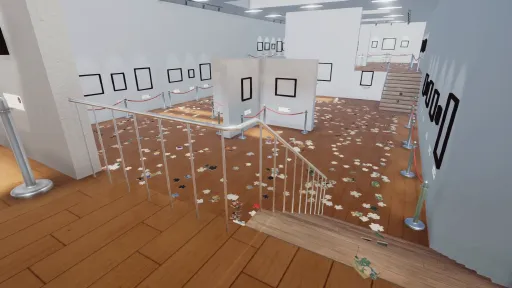
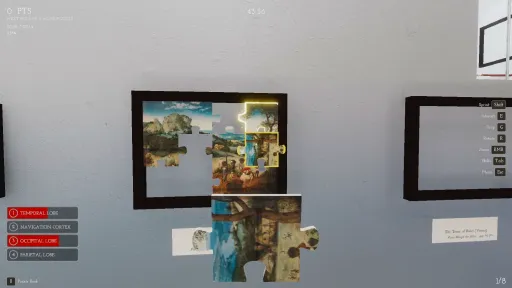
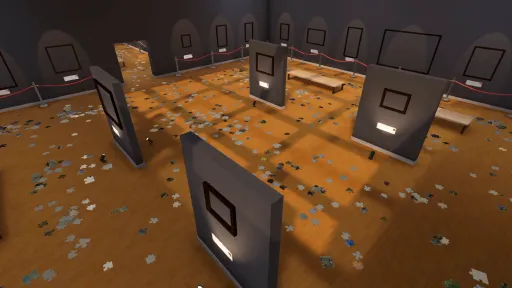
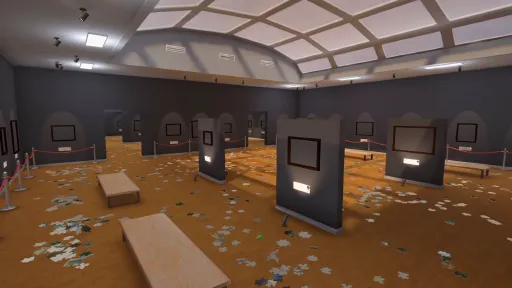
When's the worst time to be the janitor of a puzzle gallery? After an earthquake, of course! You play as the janitor of a puzzle gallery, and an earthquake has scattered all of the 5000+ puzzle pieces everywhere. Your job is to use your puzzling skills (and some added enhancements) to put all of the pieces back in their place.
The Ultimate Challenge or the Coziest Simulator
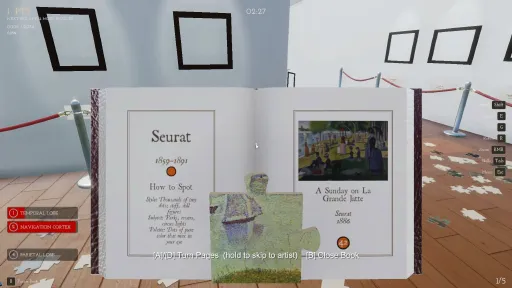
Listen to classical music and admire famous paintings as you solve nearly 200 jigsaw puzzles of varying shapes, subjects, and sizes. Whether you want to see how fast you can solve every one by min-maxing various abilities and sprinting across the gallery, or you just want to chill and work on some puzzles, this clean up simulator is right for you.
A Gallery Of Masterpieces...
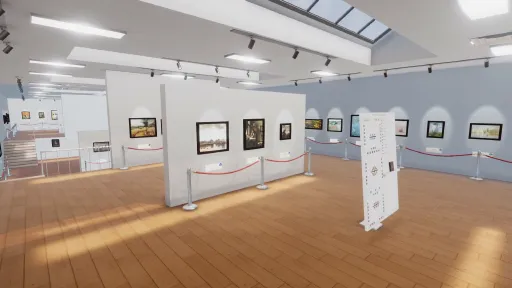
The gallery is home to nearly 200 paintings from over 20 famous artists such as Monet, Van Gogh, Hokusai, and more, ensuring each piece and section is visually unique and distinctive from the others. Each of the paintings was sourced from Public Domain scans and photographs of their museum originals.
... Or Curated by YOU
Upload your images and turn them into puzzles! You can solve them one at a time and adjust their size, or fill the entire gallery with your own curated selection in the My Puzzles game mode, providing you with full customization and endless gameplay.
But You Aren't The ONLY Janitor
The My Puzzles Custom Gallery Mode now supports up to 4 players, so whether you want to handle the mess as a solo job or bring some friends, for your own curated gallery or the classic paintings, it all gets cleaned by the end of the day.
Key Features
Intuitive controls and visuals such as ghost previews on hover and shimmering piece lock-in effects make the act of solving a puzzle both satisfying and exciting.
Skill upgrades to different areas of your brain that help you find, manipulate, and solve puzzles quicker with each puzzle you complete.
Challenge Modes for those puzzlers that don't need any extra assistance, or are looking for different challenges to make the game feel totally different such as a Black & White Mode and "The Big White" (1024 pieces of pure white).
Turn any image you want into puzzles of varying shapes and sizes so that, whether you want to create a greater challenge with a 1000 piece landscape, or just turn your pet into a 50 piece easy solve, you can solve as many puzzles as you want!
Want to curate your own gallery? You can upload up to 500 images and fill the gallery with memes, custom artwork, or really anything (so long as it's a png, jpg, webp, or other common image format).
Screenshots
7 images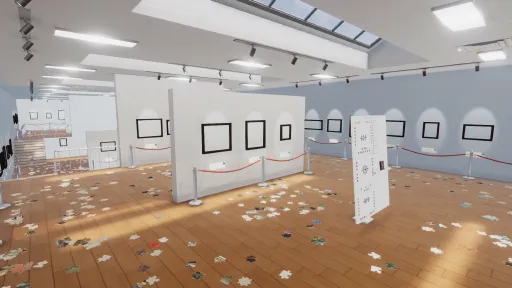
Version Information
Steam Patch Notes
Official update history
CHANGES
- increased the custom gallery/custom puzzle max pool size from 200 to 500
- added a button to resume the game on finishing it (previously, you could only go to main menu after finishing a run, but resuming would let you walk around, but now there's a dedicated button).
BUGS
- fixed bug where certain challenge modes on the new map had you earn excess skillpoints after maxing abilities
Bugs
- Fixed a bug where sensitivity changes were not persisting between runs/resumes of the same run.
That's it, happy puzzling!
QOL
- CHANGE - HUD text got a full overhaul. It's slightly bigger, has a soft drop shadow, and a thin dark outline. You may find if you play on the Large text setting that you can revert to default size now.
- CHANGE - Text Size now applies instantly. No more reloading for it to take effect. Same for switching languages mid-game.
- CHANGE - Playing on a controller? The game finally shows your buttons everywhere. The Skills menu used to show keyboard numbers no matter what input you were using. Ability slots and descriptions now show your actual bindings, in every language. And moving a mouse (or a Deck trackpad) no longer flips the prompts to keyboard icons, only a real click or key press does.
- CHANGE - First boot on a Steam Deck defaults to Large text.
- CHANGE - The puzzle book's pages are a little sharper and render at double the previous resolution. Its control prompts got the new text treatment too.
Community
So there's a "very important" lore reason that you cannot jump or crouch (it's not that important but the future will reveal all). I developed the game around not needing either, but I've heard some people say they want to jump around the gallery and crouch down to pieces. Is this something you want? Something you don't care about? Something you are VEHEMENTLY against? Let me know in the replies!
Also although we are Steam Deck playable, I'm shooting for Steam Deck VERIFIED so I will be submitting this build for approval.
- FIX - Piles now settle a bit cleaner, as well as make less noise (i increased the threshold of movement required to play the moving noise). This will probably also increase performance. Also, did you know those sound effects are just me recording my partner doing puzzles? Fun fact.
- FIX - There was an issue where the Frontal Lobe capstone wasn't flipping the pieces right away, or in a couple cases at all, this has been resolved.
- FIX - My puzzles custom puzzle mode now correctly tells you when an image isn't going to load properly and greys out the start button to prevent confusion.
- FIX - a very rare exit to menu timing issue could've potentially caused challenge mode saves to write to the main save. This has been found and fixed.
- CHANGE - Occipital Lobe's capstone "faint glow" has been changed to the new rainbow color like when it is active (and the reduce flashing setting applies to that as well and reverts to solid light blue).
- CHANGE - There's a very obvious toast now when you achieve a capstone letting you know what it does when you exit the skills tab.
- FIX - Found a couple more areas where a piece could be dropped and stuck just out of reach, patched them out so the pieces get put back in the gallery
- FIX - Found a couple sneaky invisible blockers that were causing pieces to get launched if dropped onto them. They've been removed
- CHANGE - The Big White challenge mode had an issue where the rescatter was scattering pieces in the blocked off gallery. It works now.
Have a good weekend everyone!
I added one more fall back for those that are having trouble locating their logs and save files, as well as their custom puzzle folders.
- CHANGE - Both the "Report A Bug" and "Open Folder" buttons have been modified across the board to copy the path to the associated files/folders in question for those players who are having issues locating them or with the game not opening their location for you.
That's it! That's the small patch... sorry and thanks!
(also shoutout to everyone, day 2 has been just as amazing as day 1 and I'm just beside myself reading some of these kind comments and reviews)
More QOL changes based on the feedback and bug reports regarding renaming a certain ability and making finished puzzles a little clearer.
- CHANGE - Endgame Secret Ability - The endgame secret ability has been renamed. I get the name it was previously called mixed up with another word that sounds just like it. iykyk.
- CHANGE - Finished or "Finished" - Some players have experienced issues with coming REALLY close to finishing the gallery, maybe even thinking they finished, but their logs seem to indicate that something is JUST off. I have expanded Occipital and the Secret Endgame Ability to now recognize incorrectly slotted/rotated/placed pieces to better help in these cases, as well as the resettle button in the settings. I've also added an effect to completed puzzle frames so that locating the troublesome puzzle is a little easier, and finishing them is a bit more magical (they're just slightly brighter and have little gold flecks coming off).
- CHANGE - Occipital Again - Occipital's been changed from a light blue (the color not the brightness) to a cycle of colors, and its flashing adjusted to help with it getting washed out by the bright gallery (galleries are so bright).
- CHANGE - Autosave - The game previously only autosaved on puzzle complete, it now ALSO autosaves every 5 minutes.
- CHANGE - Challenge Mode Unlocks - Challenge modes are now ALL unlocked after completing the base game, so you don't have to wage slave away as a janitor before going for "The Big White"
- CHANGE - What's that clicking? - The Frontal Lobe ability was triggering its sound every autocast even when there is no pieces to flip over. It now checks if there are any pieces to flip, and if there aren't, skips its cast.
- CHANGE - Switch Controller - There was an issue where the Switch Pro controller's ZL/ZR weren't registering, this should be fixed, if not let me know and I can investigate. All controller triggers now should take a little less of a press to fire.
- CHANGE - Bug Reporting - Some players have experienced issues uploading their log files, so I've modified the report bug button to automatically copy and zip ALL the files you will need to send in and place them on your desktop (or the user file as a fallback), as well as opening the file explorer and selecting it for you.
- KNOWN ISSUE - For those players that think they have completed the game but the endgame isn't firing, the above changes and the resettle pieces button in the settings should give you all you need to locate missing pieces. However, I do not think that means there isn't a potential bug there. The logs I've seen seem to indicate that a lot of people report the game not ending but the real issue is that there is a piece or two in the wrong slot or rotated the wrong way, but that doesn't mean that is always the case or I'm not missing something. I'm continuing to monitor these logs and will continue to watch this closely. Please utilize the resettle pieces button in the settings if you believe this is happening to you, as well as look around at frames for their completed effect to ensure this isn't the case, but rest assured these changes also help me identify the problem on my end. AND, thank you for reporting the issue.
This patch (patch v1.2.10) has a couple QOL changes and preventative measures to ensure everyone is having a good time based on feedback I've received today.
- CHANGE - Occipital's glow has been brightened a bit to help it be more visible, I'll keep an eye on the feedback to ensure the amount is satisfactory
- CHANGE - You can now rotate puzzle pieces while the book is open
- CHANGE - "The Bracelet" achievement (spend 50 skill points) was previously not counting challenge mode skill spends (I am dumb and gated most achievements out of challenge modes AND custom mode). Challenge Modes now contribute to "The Bracelet" achievement. Custom modes stay gated out of achievements.
- NEW BUTTON - "Resettle" button has been added to the in game settings menu for anyone that is having trouble finding those pesky final pieces
- NEW TOGGLE - An "Invert Look" toggle has been added to settings (sorry this wasn't added before, I'm not an invert-look-Andy)
- PREVENTATIVE - Fixed a rare issue where exiting to menu at the exact moment you finished the gallery could skip the ending sequence.
- KNOWN ISSUE - As for one issue I've seen a couple people report that is a bit out of my hands is an issue with their computers preventing the boot of the game. Upon investigation, this has to do with the digital signing of the application, and most games on steam both don't digitally sign their games AND rarely hear this problem. My understanding is this is a feature that ships on newer Windows 11 installs called "Smart App Control" (SAC) that guards executables that are new and do not yet have reputation. It flags it, and prevents the opening, which sucks. However, you may find online that toggling that setting off can fix the issue. Keep in mind that doing so is permanent until a new windows installation. I can't recommend that, but what I can say is that as the game appears on other systems, the reputation should fix itself. Other fixes include uninstalling and reinstalling, but I know a couple people have tried this with no success, although other have had it work. Let me know if this issue persists in the next couple days, and I can look into getting the application officially signed so Windows doesn't block it. In the interim, I am so sorry this has happened and wish there was more I could do.
A HUGE thank you to everyone who has checked out this game, I have been overwhelmed all day by the reception and how big our release was. I am just so, so, SO humbled and grateful and will work to make sure this is the best game it can be.
If you enjoyed the game, a review genuinely helps more than you know. Keep an eye out for future patches/updates, I've got some good stuff in the works (yes, like multiplayer) and will let you know when everything is good to go!
Thanks for the millionth time, and here's to a million more thanks,
Th3GameStudio
Current Release
Build 25663207
Uploaded Oct 22, 2026
System Requirements
How to Install
CleaningUpThePuzzleGallery.exe to play
Troubleshooting tips
• Run Redist/_CommonRedist installers if game won't start
• Add folder to Windows Defender exclusions
• Run as administrator
Download
Direct link available
Needed when extracting (WinRAR / 7-Zip) — not a site login.
You May Also Like
View All




Download Cleaning Up The Puzzle Gallery for PC with a direct link or via torrent. Get the full version of Cleaning Up The Puzzle Gallery for free. Cleaning Up The Puzzle Gallery is a Casual released by Th3GameStudio.