







Hypervisor
Release is using Hypervisor bypass by DenuvOwO team.
- 1 Extract the game to a normal folder — avoid Program Files.
- 2 Enable CPU virtualization in your BIOS/UEFI — Intel: VT-x / “Virtualization Technology”, AMD: SVM Mode. Many boards already have it on.
-
3
Run
VBS.cmdfrom the game folder as Administrator, press 1, then restart your PC. On the next boot press F7 when the startup menu appears (turns driver signature enforcement off). - 4 Launch the game from its .exe in the game folder.
The crack is already applied — you don’t need to copy or patch anything yourself.
Antivirus warnings are expected. The bypass loads an unsigned kernel driver. If crack files vanish, whitelist the game folder and restore them.
Once it works, other Hypervisor games start right away — until you restart or shut down. Then repeat: VBS.cmd → 1 → reboot → F7.
When you’re done playing, run VBS.cmd again and pick the revert option to restore your Windows security settings.
DenuvOwO.nfo in the game folder has the crackers’ own release notes.
About the Game
RGG Studio proudly presents Lost Judgment, the sequel to Judgment that weaves investigative sleuthing, noir narrative, and bone-crushing combat into a story like none other.
INVESTIGATIVE ACTION
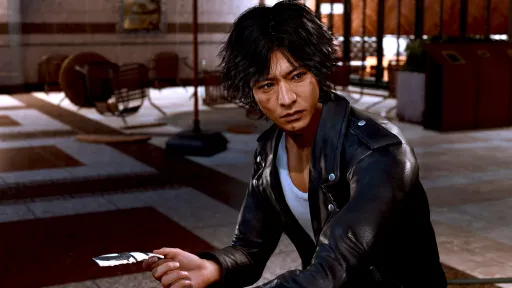
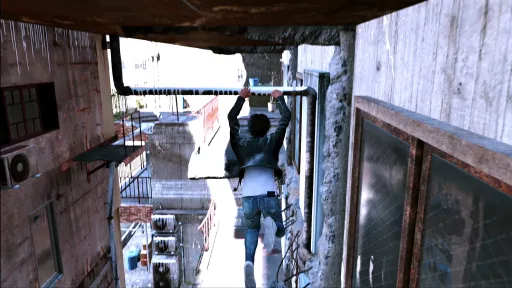
Tap into Yagami’s arsenal of private eye tricks to gather clues. Use hi-tech gadgets like drones and listening devices as well as hardboiled gumshoe methods like scaling buildings and tailing suspects to uncover the truth. No stronger evidence than catching a suspect in the act.
FREEFORM COMBAT
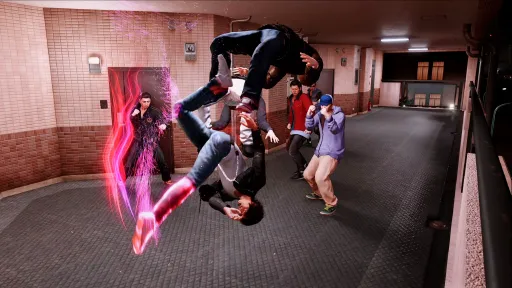
Master Yagami’s three unique, combo-heavy martial arts styles to overcome any situation from group ambushes to single-target takedowns. Plus, expand your arsenal with street signs, bicycles, and more to pack an even bigger punch.
DEEP UNDERCOVER
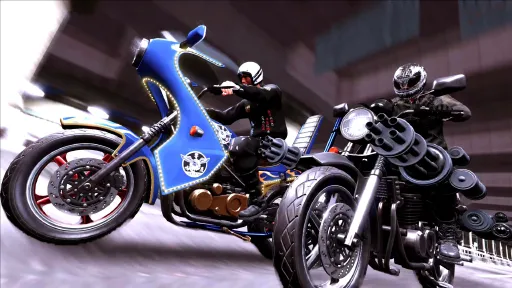
Go undercover as a high school club advisor to get to the root of the mystery, and have some fun along the way. Join the Dance Club and groove to the rhythm with your students. Challenge your ingenuity at the Robotics Club. Test your moves against fierce opponents at the boxing gym. You can even join the biker gang, where underground racing is the only way to earn respect.
HIT THE STREETS
As you comb the cities of Kamurocho and Ijincho in pursuit of the truth, take a break and get to know the unique culture of each city through bars and other nightlife hotspots. It may be worth taking on a Side Case to lend your detective skills to residents in need—you never know what might come of it.
Screenshots
5 images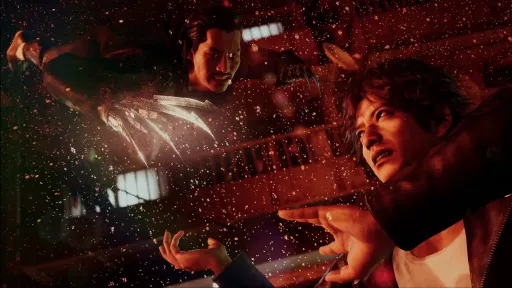
Version Information
Steam Patch Notes
Official update history
We've got some several fixes with this patch, please take a look at our patch notes. Please continue to post any issues you encounter here and thank you for playing!
Changes:
- Updated to Intel XeSS 1.1
- Addresses an issue with first boot presets not being applied on AMD Radeon RX 7000 series cards
- Addressed an issue with graphics drawing incorrectly on Intel Arc machines
We’ve recently updated the minimum requirements for this title with additional information for Windows 10 users.
The following versions of Windows 10 are required in order to play:
• Lost Judgment Windows 10 1903 (OS Build 18362) or Later
We've got some great updates and several fixes with this patch, please take a look at our patch notes. Please continue to post any issues you encounter here and thank you for playing!
DLSS support is now fully supported for Lost Judgment!
• NVIDIA DLSS , NVIDIA DLSS Sharpness are now available under Graphic Settings > Detailed Settings
• NVIDIA DLAA been added under Graphic Settings > Detailed Settings
The following settings have been changed for first boot on SteamDeck:
• FSR is now off and FSR2.1 is now active
• FPS is now 60
Other fixes:
• An issue that prevented players from clearing Hikawa’s Scoop Mission when the screen angle is in a different position.
• Addresses an issue that occurred with the destruction effect of the meter shifting unexpectedly when playing the moped race in an aspect ratio other than 16:9.
• When playing darts outside of a 16:9 aspect ratio, the mini-screen in the bottom left no longer changes unexpectedly.
Keep those issue reports coming! Here’s a list of big fixes in this update:
• Updated to FSR 2.1.2 for improving quality.
• FSR 2.1 option has been adjusted and added as a Customizable option to Anti-Alias settings.
• Updated to XeSS 1.0.1
• Addressed an issue where V-Sync does not function correctly, causing the game to go too fast.
• Addressed an issue where a portion of the upscaler was not working correctly.
• Improvements to stability during startup and play.
• Addressed an issue where Street names on the map become difficult to read when the upscaler is active.
• Fixed a portion of event scenes to play at 60FPS.
Also, we added functionality to hide the skip button during subtitled dialog.
To make this change in your graphics.ini file, please use the following steps:
1. Open a file explorer.
2. Add the following URL to the address bar: %appdata%\SEGA\LostJudgment\Steam
3. Right-click on graphics.ini and select "Open with" > "Notepad".
4. Look for "hide_skip_prompt_in_dialogues=0".
5. Change the "0" to 1.
6. Save the changes.
If you have an Nvidia GPU and have recently updated your Nvidia driver to 522.25 and are experiencing problems launching the game, please try the following workaround:
Go to Windows Settings > System > Display > Graphics Settings, then try toggling the Hardware-accelerated GPU Scheduling option to ON or OFF, depending on your current settings.
Thank you for your patience.
Thank you for playing Lost Judgment! This hotfix addresses a memory leak issue that some players have encountered when running the game on Nvidia GTX 1000 and older graphics cards.
We appreciate your continued support and wish you the best of luck on your next case!
We will be releasing a hotfix for the game shortly to address a memory leak issue that some players are reporting. This hotfix will address performance issues that occur running the game on Nvidia GTX 1000 and older graphics cards. Please rest assured the development team is looking into this issue.
We appreciate your continued support and hope you enjoy your sleuthing experience!
As always, thank you for reporting your issues. Here’s a list of fixes in this update:
- Support added for Intel XeSS.
- FSR2.1 setting added to apply only anti-aliasing effects
- Fixed an issue where a black screen would display when playing Virtua Fighter 5 Final Showdown.
- Fixed an issue with VSync set to ON that caused instability with higher frame rates.
- Improved boot-up stability.
- Patch version description on title screen and smart phone menu have been updated to reflect the correct version.
- Miscellaneous additional fixes.
Please continue to post any issues you encounter here for us to investigate and have fun!
Thank you for reporting your issues. This update addresses various fixes and adds a graphic setting. Here is a comprehensive list of fixes made:
- Fixed a crash issue when booting the game while E-Core on Intel 12th generation Core series is set to OFF.
- Fixed a freeze issue of the main character in battle mode when playing during high frame rates (120 FPS and up).
- AMD FSR 2.1 adoption and improvement of drawing quality.
Please continue to post issues you encounter here for us to investigate and have fun!
Current Release
Build 10792513
Uploaded Apr 08, 2026
System Requirements
How to Install
VBS.cmd as Administrator, press 1, then restart your PC
runtime\media\startup.exe to play
Troubleshooting tips
• Run Redist/_CommonRedist installers if game won't start
• Add folder to Windows Defender exclusions
• Run as administrator
Download
Direct link available
Needed when extracting (WinRAR / 7-Zip) — not a site login.
86326D38
7953de1f20988e09a79da9f2f805833d4ffc8143eb82004d9505953c64296e27
You May Also Like
View All








Download Lost Judgment for PC with a direct link or via torrent. Get the full version of Lost Judgment for free. Lost Judgment is a Action released by Ryu Ga Gotoku Studio.