







Mini Cozy Room: Lo-Fi
by Tesseract Studio · 30 Mar, 2025
74 downloads
About the Game
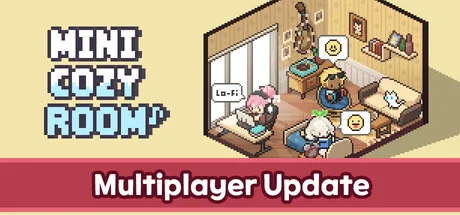
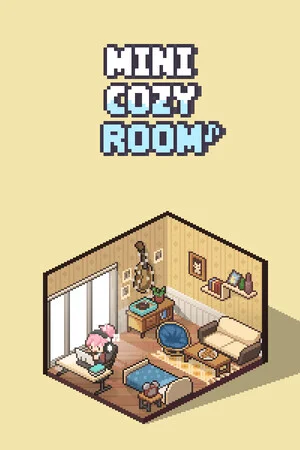
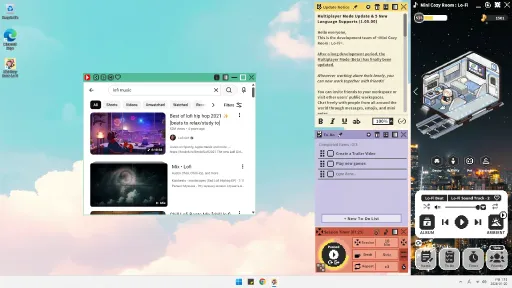
『Mini Cozy Room : Lo-Fi』is a productivity game that blends calming Lo-Fi music with creative room decoration.
Cute avatars and pets, along with convenient desktop tools like memos, to-do lists, and a Pomodoro timer, are designed to boost your focus and efficiency.
1. Your Own Cozy Workspace
Create the workspace you’ve always dreamed of!
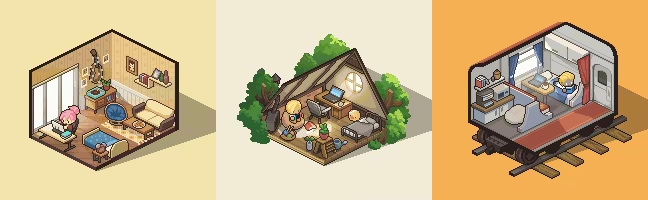
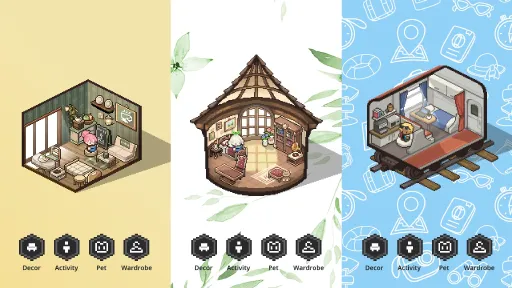
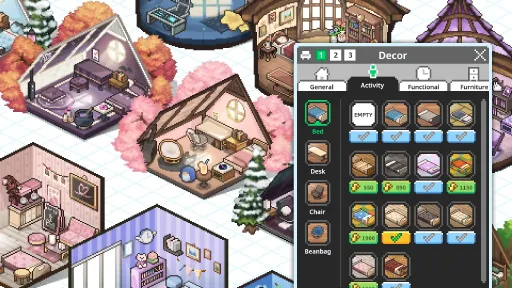
Choose from a wide variety of rooms, furniture, and decorations.
The beautiful workspace you design will help enhance your concentration and productivity.
2. Soothing Lo-Fi Music & Ambience
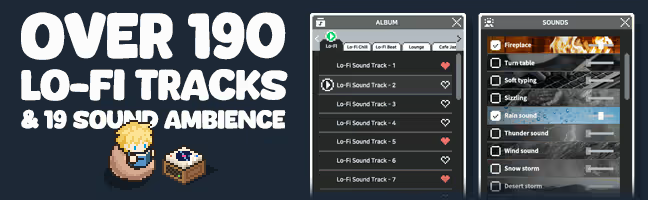
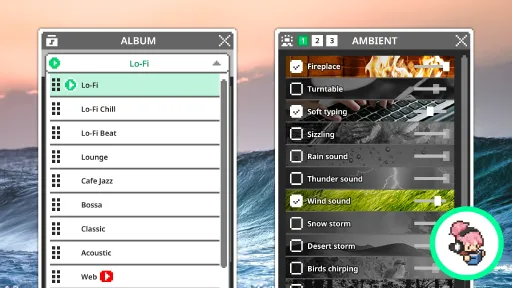
Fill your workspace with diverse Lo-Fi music genres and calming ambient sounds.
You'll soon find yourself relaxed and deeply immersed in your tasks.
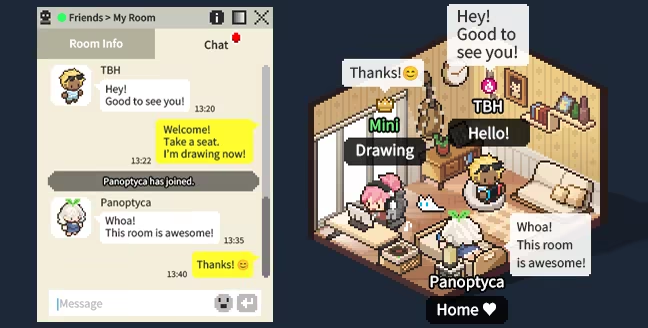
3. Multiplayer Mode
Feeling lonely while working alone?
Work together with your friends!
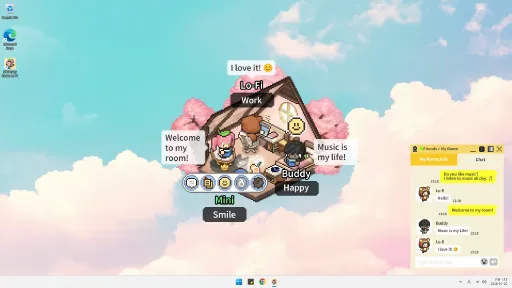
Invite friends to your workspace, or visit rooms shared by other players.
Chat freely with people from around the world using text, emojis, and mini notes.
For those who prefer a quieter environment, a Focus Mode is also available.
4. Innovative Desktop UI and Mini Mode
Freely reposition and resize notes and to-do lists on your desktop.
Feeling overwhelmed by the large game screen?
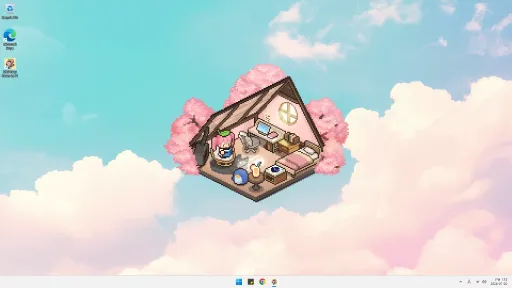
Switch to Mini Mode and conveniently place it in your taskbar!
5. Cute Avatars and Pets
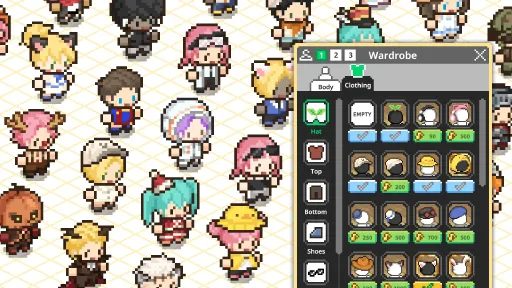
Express your unique style with diverse fashion options, hairstyles, and accessories.
Move adorable avatars to chairs, beds, or beanbags and assign tasks.
Lovely pets like cats, dogs, and hedgehogs will keep you company.
6. Key Features
Enjoy Lo-Fi music across various genres
Mix different ambient sounds to create your perfect atmosphere
Use productivity tools such as Memo, To-Do List, and Pomodoro Timer (with both count-up and count-down modes)
Customize your own avatar with various hairstyles and outfits
Design your personal workspace with different wallpapers and furniture
Add external music files (MP3, WAV, etc.) to create your own playlist
Bookmark your favorite channels using the YouTube embedded player for easy access
Earn experience by listening to music. As you level up, gift deliveries arrive in your room
Level up to unlock new items and content
Screenshots
9 images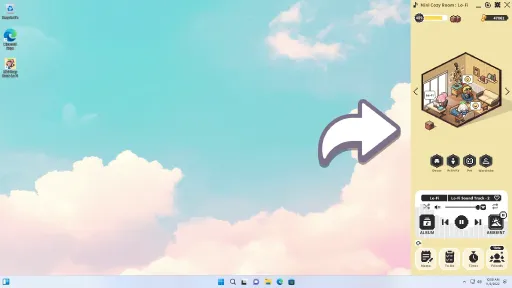
Version Information
Steam Patch Notes
Official update history
Hello, everyone.
This is the development team of Mini Cozy Room : Lo-Fi.
We've discovered a few bugs in the game and have released an update to fix them.
\[Bug Fixes]
1. Fixed an issue where character presets would not be applied after leaving and re-entering a multiplayer room two or more times.
2. Fixed an issue where character sprites would disappear during multiplayer.
3. Bed and “Turn Play” previews will no longer be displayed in multiplayer camp rooms without a roof.
4. The Activity tab will now be disabled when no furniture has been placed in a multiplayer room.
5. Fixed an issue where furniture positions would display incorrectly when moving between multiplayer and single-player rooms.
6. Fixed an issue where the Bean Bag (Empty) had to be purchased in the second room.
7. Fixed an issue where a furniture icon appeared in the pet pop-up and replaced it with the correct pet icon.
8. Fixed an issue where some bean bags appeared in incorrect positions in the square room.
Your bug reports are a huge help to the development team.
If you happen to find any bugs while playing, we'd appreciate it if you could let us know on our Discord.
Once again, we sincerely apologize for the inconvenience.
Thank you.
Hello, everyone.
This is the development team of Mini Cozy Room : Lo-Fi.
We've discovered a few bugs in the game and have released an update to fix them.
\[Bug Fixes]
Fixed an issue where the buttons on the main screen would occasionally not respond when launching the game.
Fixed an issue where the UI and background images would occasionally appear in incorrect positions when launching the game.
Fixed an issue where adjusting the volume while muted did not disable mute, causing the game to become silent again after restarting.
Fixed an issue where the character would briefly appear incorrectly when switching presets in the Wardrobe.
Fixed an issue where the heart hairpin icon was displayed incorrectly.
Fixed an issue where another player's character hair would appear incorrectly when switching from Mini Mode to normal mode during multiplayer.
Fixed an issue where the character would not display correctly after pressing the multiplayer character preset button.
Updated the game so that when a room is closed in multiplayer, the reason is displayed in a pop-up window.
Fixed an issue where, after the host returned from sleep mode, guests would be removed while the host remained alone in the empty room.
Fixed an issue where the host would remain in the room even after losing their internet connection in multiplayer.
Your bug reports are a huge help to the development team.
If you happen to find any bugs while playing, we'd appreciate it if you could let us know on our Discord.
Once again, we sincerely apologize for the inconvenience.
Thank you.
Hello, everyone.
This is the development team of Mini Cozy Room : Lo-Fi.
We've discovered a few bugs in the game and have released an update to fix them.
\[Bug Fixes]
Fixed an issue where the purchase status of furniture bought in a new room would be reset.
Fixed an issue in multiplayer mode where hairstyles would display incorrectly when wearing certain hats.
Fixed an issue where the "Launch at startup" setting did not work properly.
Your bug reports are a huge help to the development team.
If you happen to find any bugs while playing, we'd appreciate it if you could let us know on our Discord.
Once again, we sincerely apologize for the inconvenience.
Thank you.
Hello, everyone.
This is the development team of Mini Cozy Room : Lo-Fi.
Several bugs have been discovered in the game, and an update has been released to address them.
\[Bug Fixes]
Added a notification message for when a visitor is disconnected due to network issues in multiplayer mode
Fixed an issue where the screen would turn transparent when clicking UI buttons on certain laptops
Fixed an issue where a decoration would persist after switching rooms and returning while in deco preview mode
Fixed an issue where music would disappear from an album when renaming a local album
Fixed an issue where the alarm would not appear at the start of a session in the session timer
Your bug reports are a tremendous help to our development team. If you happen to encounter any bugs while playing, please leave a report on our Discord — we would greatly appreciate it.
We sincerely apologize for any inconvenience this may have caused.
Thank you.
Hello, everyone.
This is the development team of Mini Cozy Room : Lo-Fi.
Several bugs have been identified in the game, and a patch update has been released to address them.
\[Bug Fixes]
Fixed an issue where players were occasionally unable to join a room using an invitation code
Fixed an issue where the game was not displaying correctly on the configured monitor position
Fixed an issue where entry messages from other players would occasionally appear even when a room was full
Fixed an issue where the character of a player who had left the room would occasionally remain visible in the room
Added tooltip display positions for the profanity filter and contact filter settings
Fixed an issue where the auto-start setting was not functioning correctly
Fixed an issue where Russian could not be selected on the first launch of the game
Fixed an issue where playback time from the embedded player was not being counted toward music achievement time
Your bug reports are a tremendous help to our development team. If you happen to encounter any bugs while playing, please leave a report on our Discord — we would greatly appreciate it.
We sincerely apologize for any inconvenience this may have caused.
Thank you.
Hello, everyone.
This is the development team of <Mini Cozy Room : Lo-Fi>.
A few bugs were discovered in the game, and an update has been released to fix them.
\[Multiplayer Mode - Bug Fixes]
Fixed an issue where entry/exit messages were appearing in the chat window when attempting to re-enter a room after being forcibly removed
Fixed an issue where the current number of users in a chat room was intermittently not updating properly
\
Renamed "Grooming Filter" terminology → changed to "Contact Filter"
Added descriptive tooltips to the Profanity Filter and Contact Filter
Your bug reports are a great help to the development team. If you happen to encounter any bugs while playing, please leave a message on our Discord — we'd really appreciate it.
We sincerely apologize for the inconvenience. Thank you.
Hello everyone,
This is the development team of Mini Cozy Room : Lo-Fi.
Several bugs have been identified in the game, and a fix update has been applied.
\[Multiplayer Mode - Bug Fixes]
Fixed an issue where characters would occasionally appear behind furniture.
Fixed an issue where the player list in the chat room would occasionally not update correctly when users joined or left.
Fixed an issue where the YouTube Listen Together UI would occasionally appear in the Room Info tab unintentionally.
Your bug reports are a great help to the development team.
If you encounter any issues while playing, we would greatly appreciate it if you could report them on Discord.
We sincerely apologize for any inconvenience caused.
Thank you.
Hello everyone,
This is the development team of Mini Cozy Room : Lo-Fi.
Several issues have been identified in the game, and a fix update has been released to address them.
\[Multiplayer Mode - Bug Fixes]
Fixed an issue where if a user left a room due to poor network conditions, the exit was not processed correctly.
Fixed a memory leak issue in the YouTube embedded player.
Fixed an issue where the game would not close properly on Steam when forcefully terminated during multiplayer mode.
Fixed an issue where the latest chat message would intermittently not appear after sending a message.
Fixed an issue where preset buttons and room thumbnails would occasionally not match.
Fixed an issue where “YouTube Listen Together” would automatically end if a listener’s playback finished earlier than the host’s.
(In this case, the track will restart from the beginning and continue looping.)Fixed an issue in the Train Room where certain curtains appeared above the character’s head.
Fixed an issue where some language names were not displayed correctly.
Fixed an issue where the kick user function did not work properly.
\[Other Bug Fixes]
Fixed an issue where the room change button would intermittently not appear in single-player mode.
Fixed an issue where character pixel art would occasionally appear distorted.
Fixed an issue where the Afro hairstyle would clip through certain hats.
Fixed an issue where only up to four delivery boxes were visible.
Adjusted the positions of some objects in the Square Room.
\[Feature Update]
Settings > Monitor Switching: Updated so that users can select a desired monitor, move the window, and confirm the selection.
Your bug reports are a great help to our development team.
If you encounter any issues while playing, we would greatly appreciate it if you could report them on our Discord.
We sincerely apologize for any inconvenience caused.
Thank you.
Hello everyone,
This is the development team of <Mini Cozy Room : Lo-Fi>.
A bug introduced by the previous hotfix update was discovered, and a fix has now been applied through this update.
We sincerely apologize for the inconvenience.
\
Fixed an issue where the timer was not functioning properly
Multiplayer Mode: Fixed an issue where listeners’ music would intermittently stop when a new user joined during YouTube Listen Together
Multiplayer Mode: Fixed an issue where the broadcaster and listener icons were not displayed correctly
We will continue working to resolve other bugs as quickly as possible.
Once again, we sincerely apologize for the inconvenience.
Thank you.
Hello, everyone.
This is the development team of <Mini Cozy Room: Lo-Fi>.
A bug was caused by the previous update, and a hotfix has been released to address it. We sincerely apologize for the inconvenience.
\[Patch Notes]
- Fixed an issue where all DLC music, backgrounds, hairstyles, and outfits were not visible.
Thank you.
Hello everyone,
This is the development team of <Mini Cozy Room : Lo-Fi>.
A minor update has been released today.
The main changes are as follows.
<Multiplayer Mode>
3rd Room (Square Room): Updated to allow up to 4 players to enter.
(The sofa has been changed to an interactive furniture item.)[img src="{STEAM_CLAN_IMAGE}/45483857/18788c4aff6b8ea7318bf1c126d53f0ee46a3abc.png"]
You can now edit the room title and room description even after creating the room.
[img src="{STEAM_CLAN_IMAGE}/45483857/f3185d6db137fa8abc0ea1f1d9cf18800484304d.png"]
Activities can now be changed during multiplayer sessions.
When leaving a friend’s room, you will now be taken to the room list menu.
Multiplayer: When a user enters or leaves a room, their nickname will now be displayed.
If the host clicks a friend slot and attempts to move to another room, a warning pop-up will appear.
When the computer enters sleep mode, the multiplayer session will now end automatically.
Multiplayer: Updated the design of the “Leave Room” button and the “My Room Info Settings” button.
<Bug Fixes>
Multiplayer: Fixed an issue where furniture animations and character placement animations would replay when another player entered the room.
We originally planned to add new actions for the sofa when changing it to an interactive furniture item. However, since many players requested the ability to enjoy multiplayer with more people, we prioritized responding quickly by using the same activity motion as the beanbag.
We plan to add more activity motions in the future, and we kindly ask for your understanding in the meantime.
We will continue doing our best to develop a game that our players can enjoy.
Thank you.
Hello everyone,
This is the development team of <Mini Cozy Room : Lo-Fi>
A new bug was introduced in the previous hotfix update, and we have released an additional patch to fix this issue.
We sincerely apologize for the inconvenience.
\[Fix Details]
Fixed an issue where the Mini Mode control panel was not visible
Fixed an issue where the Mini Mode control panel could move outside the screen
Fixed an issue where the Mini Mode control panel disappeared when pressing the Mini Mode reset button
Fixed an issue in Multiplayer mode where all players except the host were disconnected when a private room reached maximum capacity
Fixed an issue where the embedded player did not come to the front when clicking the Friends window
We will continue working to resolve other bugs as quickly as possible.
We sincerely apologize once again for the inconvenience.
Thank you.
Current Release
Build 24727575
Uploaded Sep 08, 2026
System Requirements
How to Install
MiniCozyRoom.exe to play
Troubleshooting tips
• Run Redist/_CommonRedist installers if game won't start
• Add folder to Windows Defender exclusions
• Run as administrator
Download
Direct link available
Needed when extracting (WinRAR / 7-Zip) — not a site login.
A3CDC59E
573a7b38a9db4b260255c84ad4208e4845ab67cff5554356c4deb9bb1f8551ba
You May Also Like
View All









Download Mini Cozy Room: Lo-Fi for PC with a direct link or via torrent. Get the full version of Mini Cozy Room: Lo-Fi for free. Mini Cozy Room: Lo-Fi is a Casual released by Tesseract Studio.