







About the Game
WARNING! THIS GAME IS IN EARLY ACCESS. IT IS BUGGY AND COMPUTE HEAVY. PLAYERS MAY FACE POTENTIAL BUGS, FREEZES, AND CRASHES.
WHILE THIS GAME UTILIZES WEBGPU and ELECTRON, LINUX/PROTON/MACOS ARE NOT OFFICIALLY SUPPORTED YET.
I UNDERSTAND THAT THE AI GENERATED CONTENT IS UNAPPEALING AND AM HEAVILY FOCUSED ON ADDRESSING THIS ISSUE.
THERE IS AN ACTIVE DISCORD COMMUNITY, PLEASE JOIN IF YOU'D LIKE TO PARTICIPATE IN ITS DEVELOPMENT.
NUCLEAR DESIGN BUREAU is a hardcore sandbox engineering game where you design and test nuclear devices.
You are a junior engineer at the Kurchatov Institute. The State gives you a target and a warehouse full of dangerous materials. Some directives limit what you are allowed to use. Your job is to build a device that does what the directive asks.
This game is built in the open. The campaign, the physics and the tools change based on what players build, where they get stuck, and what they ask for. That is the whole reason it is in Early Access.
HOW IT WORKS
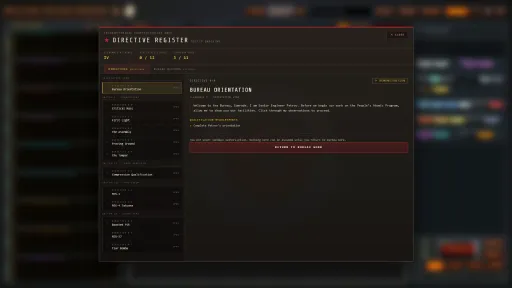
- Receive a directive: Technical requirements and constraints, with material limits on some jobs.
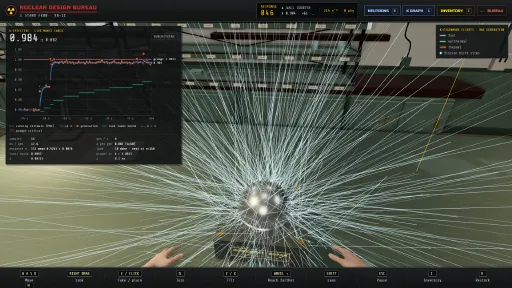
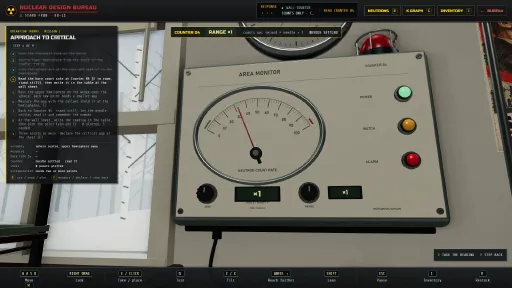
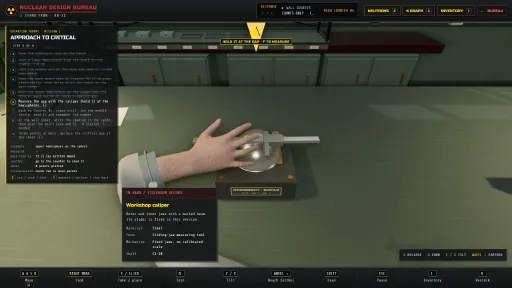
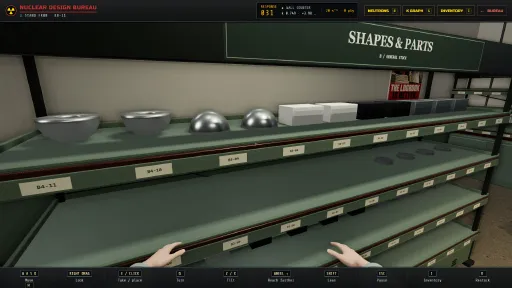
- Measure it by hand: The criticality lab is first person. Set the core in its cradle, lower the beryllium reflector onto it, and watch the counter on the wall while the live k estimate climbs toward one. Push it too far and the dose lands on your hands, not on a number.
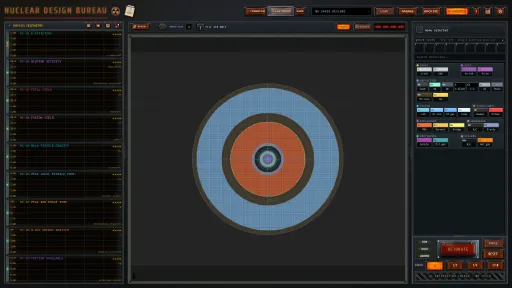
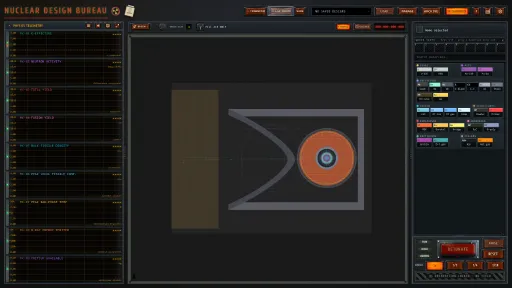
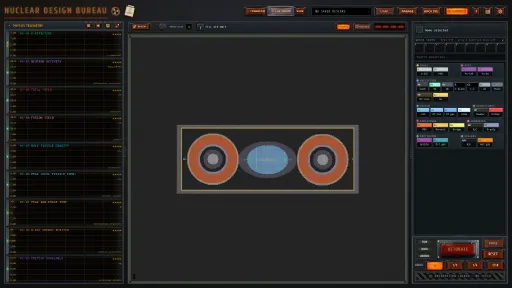
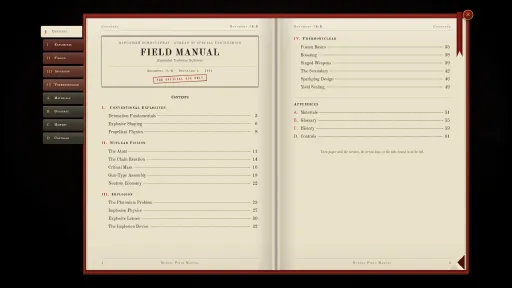
- Design: Paint materials straight onto the blueprint grid. Build the primary, the casing, and the supporting systems.
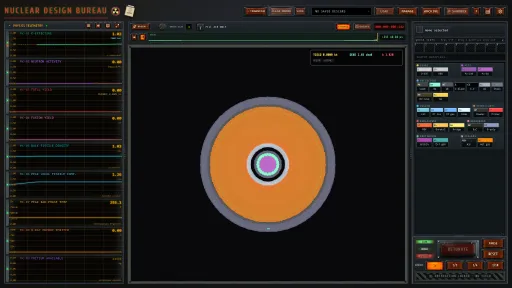
- Simulate: Hit the red button and run full detonation physics in real time.
- Refine: If it fizzles, fails, or wastes material, work out why and change it.
CORE FEATURES
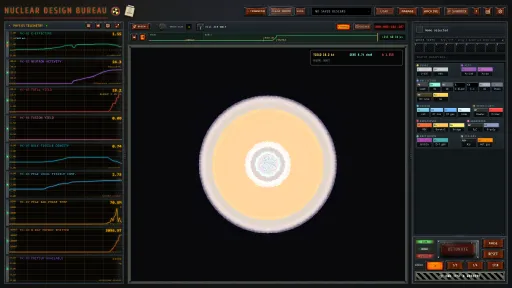
- Physics-Driven Simulation: Shockwaves, heat, radiation, and chain-reaction behavior are modeled in real time.
- Criticality Lab: A first person room where you handle the real parts. Live Monte Carlo k-effective, a wall counter that lags the way the instrument actually would, and radiation exposure that shows on the operator instead of in a readout.
- Detonation Viewer: Observe detonations as they unfold, with live visual feedback on blast behavior.
- Campaign Directives: Structured mission progression with technical goals and constraints.
- Sandbox Mode: Unlimited experimentation with full design freedom.
- Iterative Engineering Loop: Build, test, diagnose, and optimize.
EARLY ACCESS STATUS (CURRENT BUILD)
The current Early Access build is playable end to end and includes the core gameplay loop:
- Design -> Simulate -> Detonate -> Refine
- The criticality lab
- Sandbox mode
- Campaign directives
- Save/load systems with ongoing stability improvements
This is an active development build. Expect balance changes, physics work, and campaign iteration during Early Access.
EARLY ACCESS ROADMAP (SUBJECT TO CHANGE)
Physics and Simulation
- Refining the detonation viewer (better shockwaves, damage radius and thermal radiation modeling, destructible buildings and targets)
- Finer grid resolution for stronger PCs and GPUs
- More to do in the criticality lab
Campaign and Content
- Expanding the campaign with unique challenges
- Many more directives/missions
- Voiced campaign
- Additional bomb concepts (high-radiation designs, clean bombs, neutron bombs)
- More advanced materials
Presentation and Audio
- More music tracks
Community and Meta
- Public leaderboard
- Statistics on every campaign directive, so you can compare how efficient your design was against everyone else's
DEVELOPMENT APPROACH
Design. Simulate. Detonate.
Early Access is where this game gets shaped in public. What players build, where they get stuck, and what they ask for decides what gets worked on next. Most of the day to day happens on Discord.
"The atom is not a soldier, Comrade. It is a force of nature. We merely tell it where to go."
Screenshots
12 images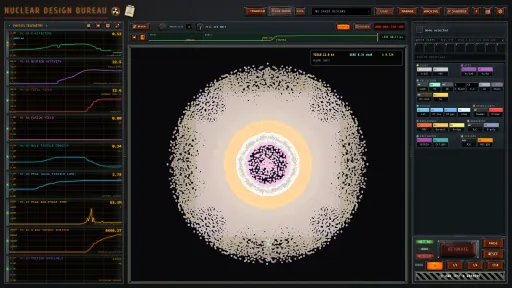
Version Information
Steam Patch Notes
Official update history
- Fixed every shot stopping with an error on some NVIDIA RTX 30-series cards
Changelog
Crashes and lost work
- Fixed shots with material packed too tightly to calculate crashing the graphics driver, they now stop with a notice
- After a graphics driver crash, the game tries the card again before it asks you to restart your PC
- Large clipboard histories no longer run the game out of memory at start
- Your records are no longer lost when a better run is filed
- Restoring a board no longer wipes a directive's casing
- Fixed a design too large to calculate detonating after a reload
- Fixed designs that fit being refused as too large
Campaign
- Directive 1-2 marks a short casing or core in red, and Petrov's panel keeps clear of it
- In Directive 1-2's Move the slug, the piece stays selected for the arrow keys
- Fixed Directive 1-3 not moving on after RESET
- The DETONATE line no longer names a Petrov step before it is shown
- A finished directive can no longer be completed a second time
- Proceed after a Special Order goes to the directive you had reached
- After a rejected shot, RESET marks the cells you changed
- A step that needs a folded tool row now shows it
- A refused D-T generator placement now says why
Controls and settings
- Safety covers open with one click, plus a setting to turn them off
- A failed display change in Settings no longer blocks the next one
- The material list keeps its width at every window size
Museum and performance
- In the museum a standing two-stage design stays upright
- Cut faces in the museum no longer show dark streaks
- The museum's cut view uses less memory
- Steam Cloud uploads of large saves are faster
Known issues
- AMD RX 9070 cards resetting during some shots
- Crashes at start-up on Linux/Proton and Steam Deck
- Graphics cards dropping out during long sessions on some PCs
- The Steam overlay and achievement pop-ups on Windows
- Materials like steel and lead coming apart at the start of a shot
Please report bugs with Report a Bug in the Esc menu
Changelog
Stuck or lost progress
- Fixed Directive 1-2 not moving on when casing steel was missing. The missing cells are now marked red
- Fixed Directive 2-2's lens step not saying what is missing. The guide turns green when the lens is right
- Fixed Restart campaign and Import replacing your Steam Cloud career during a sync conflict
- Re-opening a placed shape no longer erases what was under it
- The shot log keeps every row
- Fixed BACK completing First Light a second time
Start-up and graphics
- Fixed graphics turning off at start on PCs with the Steam overlay, OBS or RivaTuner
- The graphics restart message no longer loops. The second time, it offers Continue or Quit
Campaign
- After a directive is complete, the DETONATE line and the card point to the next one
- After a Special Order, the card offers Proceed to the Directive Register
- A failed shot shows peak K and peak compression next to the yield
Saves and crash reports
- When a save fails, the quit questions say what will be lost
- When a Steam Cloud upload has to wait, the game says why
- Wipe all data now also clears the shot history and the backup copies of your save
- Crash reports carry more detail
Privacy policy
The privacy policy changed on October 29, 2026. If crash reports are on, a crash report now also carries how much memory the game used and how much your computer had free before the crash. It also carries the graphics process's memory during a shot and how many saved items the game could not read. The full text is in Settings > Legal.
Still working on
- Crashes at start-up on Linux/Proton and Steam Deck
- AMD RX 9070 cards resetting during some shots
- Materials like steel and lead coming apart at the start of a shot
- The Steam overlay and achievement pop-ups on Windows, off for now
The previous build is on the "previousbuild" branch on Steam.
Please report bugs with Report a Bug in the Esc menu
Changelog
- fixed no way to reach the next directive after First Light
- REGISTER now works in the 3D view
- Petrov's lesson lines no longer wait for a click
- fixed Directive 1-3 not finishing with Mirror on
- the board says why when FILL AIR or REPLACE places nothing
- the equipment notice no longer opens on 8 GB graphics cards
- Report a bug now sends your whole message
- Stand FKBN no longer loads fonts from Google
- crash reports carry more detail on graphics card errors
- the game asks again about usage data, which now covers clean starts and quits
- the privacy policy is updated
Previous build is on the "previousbuild" branch on Steam
Please report bugs on our discord
Changelog:
simulation run a little faster
F12 saves a screenshot to your Steam library with the overlay off, and the key can be moved
Petrov's panel can be dragged, and it no longer covers what a step needs
fixed Directive 2-2's first circle not placing
Directive 3-2 now asks for more than 13 kt, down from 15
when a shot makes its yield but uses too much U-235 or no plutonium, Petrov says so
Special Orders are numbered 5-1 to 5-22
fixed the brush painting on after you let go of the button
fixed the board sometimes picking the cell next to the one under the cursor
fixed black blobs in the mushroom cloud
fixed the game going idle while you watch a shot
fixed large Steam Cloud saves not restoring, and a restore cut off halfway now finishes on the next start
fixed Workshop uploads from Linux and Steam Deck arriving empty
fixed new records waiting behind old ones being filed again
a one-time notice to update your driver on AMD RX 9070 cards with Adrenalin 26.8.1
bug reports now include your completed directives and how much space your saves take, and the privacy policy is updated
Previous build is on the "previousbuild" branch on Steam
Please report bugs on our discord
Changelog:
fixed First Light not finishing after the 3D view unless you clicked Petrov's last line
new Seed option in Sandbox, the die key next to k at rest or Seed in the right-click menu
fixed gunpowder causing different yields each time on the same seed
after Tsar Bomba, Proceed opens the Register on your first open Special Order
fixed very large designs not filing records
the board shows its keys in the bottom-left corner while the pointer is off it
Stand FKBN's mouse look now uses raw mouse movement
the page's background motion pauses after 30 seconds without input
crash and bug reports now name the tutorial step and the graphics startup step, and carry larger designs
the Helium bulletin now sends bug reports to Report a Bug in the Esc menu
Still working on:
AMD RX 9070 cards resetting during some shots
crashes at start-up on Linux/Proton and Steam Deck
the Steam overlay and achievement pop-ups on Windows, off for now
materials like steel and lead coming apart at the start of a shot
Previous build is on the "previousbuild" branch on Steam
Please report bugs here on the discord
Changelog:
fixed the three hidden achievements never unlocking. They are now checked when you press RESET
new icons for the 11 original achievements
fixed Directive 1-3 getting stuck after a restart. board is saved as "Board from Proving Ground"
fixed Skip on the Proving Ground timer step leaving the tutorial stuck
fixed Sandbox refusing every shot after Directives 5-17, 5-18 or 5-19
fixed records not filing after a few quick shots in a row
fixed records refusing a shot just inside a directive's limit
a design you opened from another player's record or Workshop item is no longer filed as your record
directive cards show enough decimals near a mass limit (5-3 showed 4.00 kg for 4.003 kg)
a rejected shot's report now shows its real burnup
folding the telemetry panel during a shot no longer erases that shot's graphs
the mirror line can sit on the exact centre of the board and stays where you put it
fixed W and S turning the museum's 3D view the wrong way
the museum scientist walks between the exhibits and greets you at the lift
the equipment notice now looks only at your graphics card and names it
fixed a false "Previous session ended unexpectedly" after Windows shut down with the game open
the game rebuilds its graphics cache after a graphics crash or a driver update
One-Point Safe (5-28) now says to remove the other detonators
the first-start notice and the Privacy Policy now say what the game sends
Still working on:
AMD RX 9070 cards resetting during some shots
crashes at start-up on Linux/Proton and Steam Deck
the Steam overlay and achievement pop-ups on Windows, off for now
materials like steel and lead coming apart at the start of a shot
Previous build is on the "previousbuild" branch on Steam
Changelog:
fixed designs going missing from the clipboard history. Designs lost before this fix can't be brought back
the game now keeps a copy of a save it can't read before it starts fresh
fixed Selectable Yield shots not counting when the pit went off before the generator (Directives 5-27 and 5-28)
the Workshop and the museum now keep a shot you end with RESET
fixed Bulk Fissile Density jumping to 3x to 7x late in long shots (Directive 2-2)
fixed a crash screen in the second shot after a RESET
k at rest says "No fissile material" only when the board has none
pressing k at rest again hides the reading
the records screens load faster
right-click the telemetry graphs to compare up to five earlier shots
new Report a Bug key in the Bureau menu (Esc) and in Settings > System
crash reports now include the design on the board and what the game was doing (only if you turned crash reports on). The game asks about crash reports once more
records filed with your graphics card before it became optional are filed again without it, unless you turned on Show graphics card on records.
Linux/Proton: "Draw the interface on the GPU" is on by default again, to reduce the board flickering during shots. If you changed a display setting since Helium, turn it on in Settings > System
new Windows app icon
the Privacy Policy is updated to match these changes
Still working on:
AMD RX 9070 cards resetting during some shots. If you have one, please post a design that does it in #bug-reports
crashes at start-up on Linux/Proton and Steam Deck
materials like steel and lead coming apart at the start of a shot. Please post a design that does it in #bug-reports
Previous build is on the "previousbuild" branch on Steam
Changelog:
fixed the tool options (like wall thickness or star lens rotation) disappearing after a shot. Going back from the 3D view now resets the shot
challenges no longer count a shot forced past the "critical at rest" warning
fixed a case where a challenge's report didn't open at RESET after its targets were met (Directive 4-7)
fissile burnup no longer counts depleted uranium
updating a Workshop design no longer cuts its description short
fixed the game slowing down after about 20 directives
if your graphics driver stops responding, the game now says so and offers to restart
fixed a rare error that stopped a shot right after RESET
Fill Air Only and Replace Only sit side by side
crash reports name the part that crashed (only if you turned crash reports on)
the Privacy Policy now covers the crash files the game keeps on your PC.
Still working on:
AMD RX 9070 cards resetting during some shots. If you have one, please post a design that does it in #bug-reports
crashes at start-up and the board flickering during shots on Linux/Proton and Steam Deck
Previous build is on the "previousbuild" branch on Steam
Changelog:
Big designs speedup. 2nd stage burn should be faster
Dt crash fix, extremely large DT volumes being compressed may still cause problems
Yield card in canvas doesn't stretch with the canvas anymore
notices on canvas stay visible when zoomed in
telemetry units moved to be beside value and not under it
changed DT ice message in campaign
low pc specification warning uses recommended specs now
fixed bug for first mission not advancing after moving dialog box
Previous build is on "previous branch" on steam
Changelog:
PU and U235 resist compression more so yields will change
Fixed single pixel microbombs
Fixed sim speed changing yields
Fixed devises with more than 8 fissile clusters fizzling
fixed neutron leaking out of LID and DU too fast
fixed hot gas not expanding
fixed single particles slowing down or stopping designs
foam should not be as slow anymore
fixed temps and xray readouts reading impossible values
xray chart now shows xrays that have escaped the the device
fusion yield now shows percentage of fusion fuel burned
fixed sim not working after a single broken simulation
added warning for extremely large fissile masses attempting to be simulated.
fixed DT gen not firing on auto targeting
fixed slowdown after neutron firing overrides speed setting
campaign text rewritten
RDS-4 directive yield requirement changed to 15kt
fixed missions only counting if accept was pressed right before a shot
Directive card redone
fixed scroll covering the accept button
first directing now explains that you have to press detonate twice
Added the shape's real size in cm to the draw tooltip.
The board you are working on is saved and comes back after a restart.
Transfer is now called SHARE.
Added Clear all marks and delete under the pointer to the board's right-click menu. The menu lists every tool.
Added Clear guides to the Guide tool.
Radial, Guide and Select show their help.
Added Mirror new points to the Curve tool.
Fixed Hole X and Hole Y making a hole twice the size entered.
Fixed rotated rectangles landing off the grid.
Fixed knobs needing three wheel notches per step.
Added Fill air only to Star Lens and Radial.
Fixed the board jumping or flashing black when switching tools. Added a key to fold the tool options row and a setting to keep it open.
Fixed Ctrl+Z undoing several steps at once and held arrow keys moving a selection too far.
The board draws at full resolution on 1440p and 4K screens.
Fixed the placement tooltip leaving a ghost behind the pointer.
Fixed low-contrast text and the selected speed being hard to see.
Fixed material being placeable after DETONATE was pressed.
Fixed WASD in the detonation viewer acting one key late.
Graphs keep drawing while the window is unfocused.
Fixed the yield readout switching to Mt too early.
A tested design can be saved under a new name.
Long Radio Moscow song titles scroll.
The interface fonts and paper textures ship with the game. Nothing is downloaded at start.
The Kurchatov Institute now warns when your computer is below the recommended specs.
The shot readout, graphs, tool bar and detonation viewer redraw less during a shot.
Update "Helium" is still in the works
coming soon.
Steam Workshop integration, 3d museum and new challenges**
Last version is on previous build in case your game completely breaks
proton users please file a bug report if the sim is crashing again, I will try to fix it. Make sure to include logs
Missing buttons UI bug fixed
Current Release
Build 26003045
Uploaded Oct 21, 2026
Update already requested
Uploaders have been notified
A newer version is available but not yet uploaded
Help keep this updated
Login Required
You need to be logged in to request game updates. Would you like to go to the login page?
Request Update
Request an update for Nuclear Design Bureau? This will notify uploaders that this game has an available update.
Request Submitted
Your update request has been submitted successfully! Uploaders will be notified.
Request Failed
Failed to submit update request:
System Requirements
How to Install
Nuclear Design Bureau.exe to play
Troubleshooting tips
• Run Redist/_CommonRedist installers if game won't start
• Add folder to Windows Defender exclusions
• Run as administrator
Download
Direct link available
Needed when extracting (WinRAR / 7-Zip) — not a site login.
6B650E25
85c281cc731e35aee3cd7b104b65dc3c83d825eeb7a44807da46ebd3721239a0
You May Also Like
View All



Download Nuclear Design Bureau for PC with a direct link or via torrent. Get the full version of Nuclear Design Bureau for free. Nuclear Design Bureau is a Indie released by Design Bureau KB-11.