







About the Game
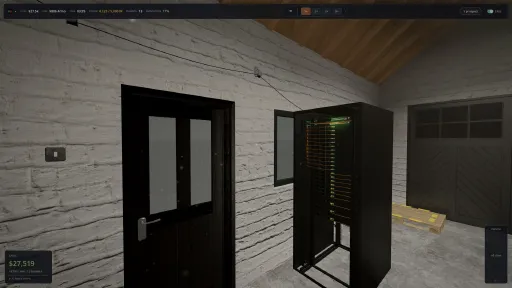
You don't manage a datacenter from a spreadsheet. You walk it.
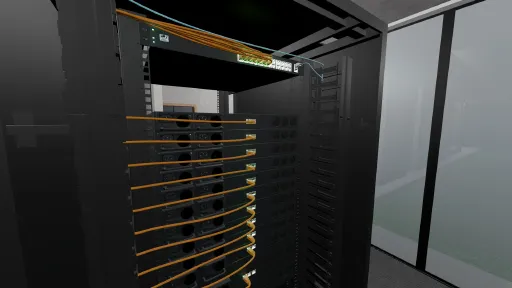
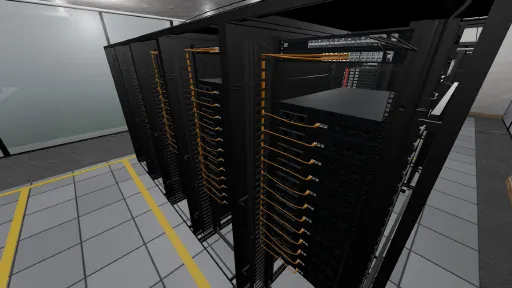
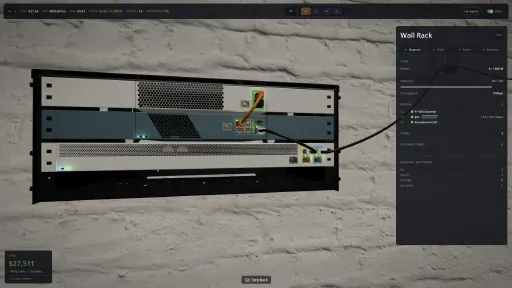
Uptime puts you on the floor of your own cloud provider, first person, hands on the hardware. You buy the servers and carry them to the rack. You seat them with a click. You run the cable off the spool yourself, find the port, watch it lay across the floor, and power the thing on. Then you sign your first customer and find out whether any of it holds.
Underneath the floor is a real simulation. Every server, switch, cable and port is a live entity in a deterministic engine, and the network genuinely switches and routes traffic across it. Power and cooling are budgets you can blow. Capacity is hardware that fills up. When something breaks, it breaks because the model says it should, and the fix is usually the one a real engineer would reach for. That was the whole goal: a build-it-with-your-hands tycoon sim that still holds up if you do this for a living.
Get it running, then keep it running. The moment traffic arrives, the simulation starts pushing back.
You're running the cloud, not a server room.
You own the full stack. The metal, the network, the services you sell, and the customers whose product lives on your kit. You're the thing they build on, so everything running on you is yours to keep alive, from the single box in the garage to a floor other companies depend on.
Your customers bet their business on you.
The tenants have names, and they hand you their product expecting it to stay up. Reputation is the currency underneath all of it. You earn it slowly and you can lose it in one bad night, and the bigger the customer, the harder that fall lands. Sign a deal you can't carry, pack one host too tight, sleep through an SLA breach at 2am, and the cost isn't only the money. It's the trust that was about to send you the next customer.
So every yes is a wager on whether you can carry the new weight without dropping what you already hold. Turning business away is sometimes the correct call. The tenants you keep won't sit quietly either. They surge, they haggle, they show up with deadlines. Keep them happy and they say so out loud, and they bring friends.
What you sell is infrastructure you actually run.
Customers don't rent "a server." They spin up the things a real cloud sells: virtual machines, object storage, managed databases, Kubernetes, load balancers, serverless functions. Each one is a service you operate. Behind every service is a control plane you have to keep alive and an agent on each host that does the work, and all of it competes for the same compute your customers are paying for.
That's where the network grows teeth. Cut a service off from its control plane and it starts to fail. Lean on one too hard and it buckles. Capacity runs out, the network can partition the very services you're selling, and the way you lay it all out is what separates a provider that holds from one that tips over.
The simulation is the game.
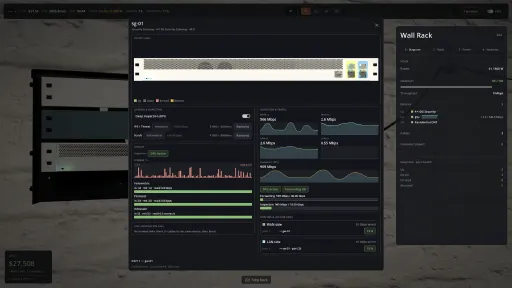
This is where the word "simulation" gets earned. Every device on your floor is a real entity in a deterministic engine, and every LED you see is reading its live state. A link saturates because the math saturated it. A rack goes dark because a fault domain you never thought about turned out to be a single point of failure.
Ports, cables, power draw, fault domains, oversubscription, link aggregation, spanning tree, BGP, mean-time-between-failures. These are the model, not labels stuck on a progress bar. Cable a redundant link the wrong way and spanning tree either saves you or, if you got it backwards, the whole floor drowns in a broadcast storm. You can ignore the depth and still win. You can also lean all the way into it.
The customers talk to you.
They live in a chat channel that reads like the ops Slack you've spent years in. They onboard, ask for more capacity, complain when latency spikes, and tell you in their own words when the change you made three minutes ago just took their service down.
Incidents don't ship with severity tags attached. Severity comes out of how many customers you're hurting and how badly. A flapping link nobody depends on is a shrug. That same link under your biggest tenant is a page in the middle of the night.
Two ways to read the same machine.
Never touched a rack? NPC mentors walk you in, and one key toggles jargon mode, flipping the whole interface between plain language and the real terminology over the exact same systems. "Spread these across separate failure zones" and "fix this single-AZ SPOF" are the same instruction. You pick up the real words by playing instead of reading a manual. Already know what oversubscription costs you? The depth was there the whole time. Turn the training wheels off.
Set the difficulty. The hard runs won't let you off.
One difficulty setting, Easy, Standard or Hard, re-tunes the entire simulation from a single neutral baseline, and you can move it mid-run. Push it up and the reputation ledger turns crueller: slower to earn, quicker to lose, less willing to forgive an incident. The authored hard scenarios set their own floor, so the slider can make them tougher but never softer.
Garage-to-Glory is one story, not the only one.
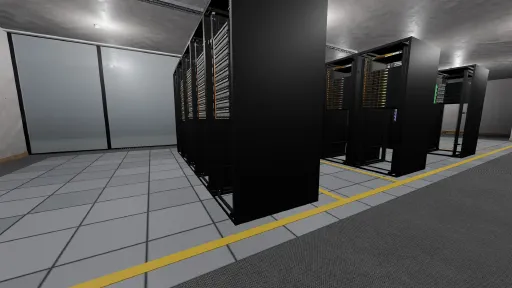
The campaign takes you from a single server in the garage to your own data center floor, growing through a basement build-out and into a room you fill and defend. That's one scenario. Run the hard-mode variant. Survive Data-Loss Day. Hold the line through Under Attack. Or drop into open sandbox and build with no rails at all. Scenarios are plain, readable files, so the community can write their own starts, disasters and constraints and drop them straight in.
This is Early Access. The data center floor is built to grow: add rows and cages to expand it, spread your customers across separate zones, and build real multi-region resilience by hand. More hardware, bigger scenarios and hyperscale scale are on the road ahead.
For the engineers.
You already know whether we mean it. Here's what's under the hood:
Typed ports and cables, with real LAG / link-aggregation across member links
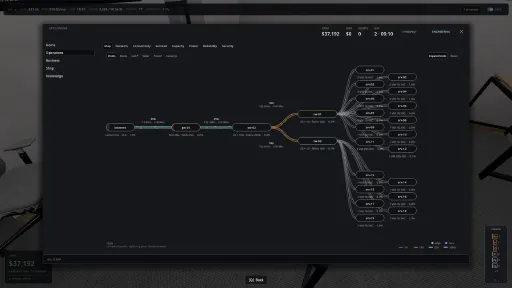
Managed L2 and L3 switches forming an actual switching fabric, not one abstract "network" stat
RSTP that converges, elects a root bridge and blocks redundant ports; loop the network and it storms
Oversubscription that bites when you cheap out on uplinks
Fault domains and single points of failure that are computed, not painted on
Reachability chains from host to switch to demarc to uplink, gating every allocation
Every service split into a control plane and per-host data-plane agents; partition them and it goes headless
Power draw and wear modelling, so hardware ages and degrades instead of tripping a random death timer
Capacity modelled as workload shapes fitting host shapes rather than a scalar bar
Reputation as an asymmetric ledger, with a capacity-fit check before you ever sign
A deterministic engine: same seed, same run, every time, headless-testable and replay-stable
Built honestly.
A deterministic Rust engine runs the simulation, and the renderer only ever shows you what the engine already decided. Nothing gets faked for the camera. Scenarios and mods are human-readable files. Windows, macOS and Linux from day one.
Uptime is in Early Access. The full loop is here and playable now: campaign, sandbox, hard modes, and the customer and service simulation underneath them. Early Access is where the breadth grows on top of that, more places to build, more hardware, more scenarios, and steady polish across art, audio and onboarding, with the direction shaped by what players push on, the infra crowd most of all.
Features
First-person, hands-on - walk the floor, carry the hardware, run the cable. You're in the room, not hovering above it.
Cabling as a hero mechanic - run every link by hand, with typed connectors, enforced reach and bend radius, and a live edge that carries traffic. Pull it and something goes dark. The way Factorio makes belts feel good.
Customers as commitments - reputation earned slowly and lost in an instant, every signup a bet against the capacity you can see.
A real cloud to run - VMs, storage, databases, Kubernetes, load balancers and functions, each with a control plane and data-plane agents on your hosts.
A simulation that pushes back - ports, power, fault domains, spanning tree, oversubscription and BGP are the actual model.
Emergent incidents - severity comes from real customer impact, not scripted labels.
Readable for anyone, honest for the pros - one-key jargon toggle over the same systems, no manual required.
Difficulty you control - live Easy/Standard/Hard that re-tunes everything, and hard scenarios that won't soften.
Breadth of play - campaign, scenario variants, open sandbox, and drop-in community scenarios.
Deterministic and mod-friendly - same seed, same run, plain-text scenario files.
Screenshots
10 images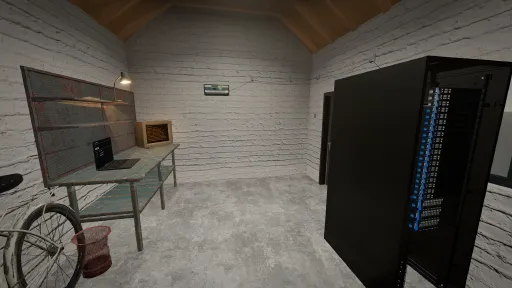
Version Information
Steam Patch Notes
Official update history
Fixed
Repairs and failures
- Start repair brings a failed server back. It returns minutes after the work order ends, unless a dead part, a tripped breaker or a zone outage holds it down, and #ops says which.
- A repaired server no longer waits for a neighbour. Replacing a dead part brings the server back even while another server in its rack is down with its own, unrelated fault.
- The event feed says why a server failed. It names a hardware fault, a tripped rack breaker, a zone power loss, overheating or a failed part instead of "downstream of upstream failure".
- A zone hit by a second outage stays down until the second one ends. It no longer reads healthy when the first outage ends while some of its servers are still dark.
- Loading a save leaves uplink alarms alone. An open uplink saturation alarm no longer closes on load, so a reload no longer pays out reputation and skill or restarts the alarm's clock.
- Removing one switch of an MLAG pair dissolves the pair. The other switch no longer reports a partner that is gone until you reload.
Customers and capacity
- Customers stop asking for VMs no server on sale can hold. A busy customer asks for the largest VM a server you can buy at your site can run, or does not ask.
- A refused growth request stays refused. The customer no longer asks again every minute and costs you trust each time you say no. They ask again once you install a new server.
- Prospects size their VMs to servers your site can buy. The game caps a prospect's VM size by the servers on sale at your site, not by every server in the catalog.
- GPU and special servers no longer count as room for ordinary VMs. A prospect or growth request that fits only on a GPU, RISC-V or mainframe server now reads as not fitting.
- Passing on a GPU prospect you cannot seat is free. Turning down a GPU customer when you have no free GPU no longer costs reputation.
- Customers lose patience during a long outage. They move from polite to worried, angry and leaving at the pace their contract sets, and their messages show it. Before, their tone never changed.
- Customer trust falls during an outage. A customer's trust now drops through a long outage at the rate their contract sets, and it feeds their mood and whether they stay. Before, it never moved.
- Customer message moods vary again. After about three months of play, every customer message had used the same mood.
- A customer with nothing running shows nothing serving. The customer page no longer keeps the last serving count after a customer loses every unit.
- A storage bucket short on disk asks for storage. A bucket that the failover reserve blocks now says it needs storage, not compute.
- Managed databases count as noisy neighbours. The CPU contention alert names a database when it is the heaviest load on a server, and the server console counts every service's CPU right after a load.
- A refused isolate keeps the customer's segment. If the game refuses to isolate a customer onto dedicated servers, the customer stays on their old segment instead of dropping to the shared one.
Network and traffic
- Traffic between your servers stays off the internet line. During a flood, server-to-server traffic no longer counts against the site's inbound line, so a flood that fits the line no longer fails requests.
- A switch behind an inline firewall or a patch panel can saturate. Its uplink now has a limit, so the switch raises a saturation alert when that uplink fills.
- Targeted floods spread across a customer's zones. A flood aimed at a customer in several zones now hits some and spares others, where it used to hit all or none. A running flood may move.
- Every bonded port counts its traffic. Each member of a server's bonded connection now adds to its lifetime traffic counters, not only the first.
Interface
- Marking ports for a bond no longer resizes the console. Switch, gateway and appliance consoles keep room for the Bond button, so the window keeps its size as you mark ports or change mode.
- The rack side panel stays on screen. A full rack, a long name or a saturated switch no longer pushes it off the right edge, and long readouts show in full on hover.
- CPU figures use one word for each thing. Physical cores read pCPU on the Capacity page and a prospect's free capacity, as on the server console, and vCPU is the overcommitted amount you can sell.
- Capacity rack space skips gear in your hands. The Capacity page no longer counts a server you carry as used rack space.
- Gateway shop rows show their ports. In engineer mode a gateway lists its port summary as its name, as switches and appliances do.
- Four port types get proper labels. SFP56, SFP112, QSFP+ and QSFP56 ports show readable names instead of raw ids.
- Sandbox settings stay in their shown ranges. The game holds a value set during a run, from the host or the API, to the range the configurator shows.
- Hints and the Codex match the incident cards. The text that tells you what to check reads the same in all three places.
- More of the game can be translated. The security log, the spread warning and the sandbox labels now use translatable text. The English wording stays the same.
Notes
- Saves load both ways. A v0.1.75 save opens in v0.1.74, and older saves open in v0.1.75.
- Version lock. The game and its server now speak protocol 73, so a v0.1.75 client cannot join a v0.1.74 server or the reverse.
- Load once to heal old id counters. A very old save that lacks some id counters no longer hands out an id it already uses. Nothing moves and nothing is renamed.
- Finished work orders are cleared. The game removes a work order a day of game time after it closes, so a long game keeps a smaller save.
- API fields removed. About 60 view fields that nothing read are gone, including the host monthly cost fields, cable routing fields and customer lifetime request counts. `docs/protocol-history.md` lists each.
- API fields changed. `SiemEventView` carries `msg_key` and `msg_args` instead of English text, `ServiceDemandView` adds `reason_key` and `reason_args`, `HostSkuView.arch` and `accelerator` use the enum name, and `HostUplinkView.lag_mode` is typed.
Fixed
Network and failures
- A busy switch only fails traffic that crosses it. A saturated or storming spine no longer drops requests routed through a different spine, and MAC flap losses follow the path each flow takes.
- Workloads leave a failing zone for servers that stay up. When a zone, rack breaker or heat runaway takes servers down, their workloads no longer move onto a neighbour that fails seconds later.
- CPU contention incidents point at the busiest server. A customer spread over several overloaded servers is sent to the one under the most load, not the lowest numbered.
- Cutting a carrier line takes workloads off stranded servers at once. Servers that lose their only path stop serving right away, and the outage counts against their customers.
Customers and capacity
- Servers in maintenance no longer count as free room. "Can you serve it", growth requests, the capacity meters, segment capacity and the GPU verdict leave them out, so a prospect that fits can be placed.
Multiplayer
- Big dedicated servers no longer stutter when a server fails. With thousands of servers, every failure or recovery froze the world for about half a second. The game now handles it in a few milliseconds.
- Multiplayer sends far less when a message arrives. On big worlds, each new message or read thread sent every player the whole comms list again. Now the server sends only the channels that changed.
Interface
- The Relocate button moves you again. Since v0.1.72 the game refused every one-press move, and only a schedule picked in Options worked. The button now moves you on the standard schedule.
- The comms panel loads messages on big worlds again. With many customers, threads stayed empty and Mark all read did nothing. Both now update within a few seconds.
- Rack lamps match the lamps in the world. A switch, router or firewall in the rack view shows the same lamp as the device for storms, MAC flaps, saturated fabric and dead power supplies.
- Spread advice gives you numbers. A stacked service's card now says how many sit on one machine and how many to move, using the same per-machine limit as the spread warning.
- Placement problems read the same everywhere. The customer inspector and the repair hints give each reason in the same words, and a cross-network outage names the customer instead of a number.
Notes
- Saves load both ways. A v0.1.74 save opens in v0.1.73, and older saves open in v0.1.74.
- Version lock. The game and its server now speak protocol 72, so a v0.1.74 client cannot join a v0.1.73 server or the reverse.
- The metrics API now lists more series. Gateways list 7 series, firewalls 10 and SIEMs 12; fleet adds reputation, drops, scrubbing, events and attack series. Log series now answer only on a SIEM.
Fixed
Customers and capacity
- An Everyone pool leaves VRF tenants on their own servers. Adding a server to it, or switching back to Everyone, no longer fails on capacity or moves a VRF's workloads off its dedicated servers.
- "Can you serve it" counts only servers a prospect can use. Servers dedicated to other customers or pools no longer make a prospect, or a customer's growth request, look like it fits.
- Picking a VRF judges the prospect against that VRF. The verdict, the Accept button and a new GPU row read the servers that VRF can use, including a VRF with no servers of its own.
- Approving one more load balancer adds one. A load balancer request now counts whole load balancers up to the cap of four, and a customer at the cap no longer asks.
- CDN caches show the CPU they use. Each cache reserves 1 vCPU and 512 MB, and its row shows its real draw, so a busy server no longer shows load while its rows read zero.
Hardware
- Background internet noise skips servers in maintenance. The gateway firewall drops the noise it defends against, and anything it lets through lands on a working server, never one in maintenance or switched off.
- Network jacks no longer read "AC inlet". Servers moved to a bigger memory model in v0.1.64 kept their old port layout, so two network jacks showed as power inlets.
- A cable is placed in the colour you saw. Finishing a run on a slower port no longer swaps the cable to another colour as it drops to the slower cable type.
- The rack panel shows the power the rack draws now. It follows load and wear like the ops console and the breaker, instead of adding up each server's rated maximum.
Interface
- Each host pool has a Release button again. It sits beside Edit on the laptop's Isolation page and opens every server in that pool in one press.
- Options on the move-site page always opens. It works whenever the Relocate button is lit, instead of doing nothing after a gate dips for a moment.
Notes
- Saves load both ways. A v0.1.73 save opens in v0.1.72, which ignores the two new CDN reservation settings, and older saves open in v0.1.73.
- Load once to heal. Loading puts every server's ports back in its model's layout, books each CDN cache's new reservation, and removes any cable saved with one end unplugged.
- Loading can unplug a cable. A server saved with more network ports than its model has loses the extras, keeping its cabled ports first, and a cable on a removed port comes off.
- Version lock. The game and its server now speak protocol 71, so a v0.1.73 client cannot join a v0.1.72 server or the reverse.
- New API fields. Network segment views gain `dedicated_free_vgpu_slices` and `dedicated_total_vgpu_slices`, the GPU slices on a VRF's dedicated servers.
- Gateway LAN egress counts only forwarded traffic. `lan_egress_gbps` now reports what the gateway passes to your servers, so with the firewall on it excludes background noise the firewall drops.
- API removals. The `UnplugCableEnd` and `ResumeDanglingCable` commands and the cable views' `dangling_end` field are gone; nothing in the game sent or set them.
- Prospect fit fields changed meaning. Prospect and growth request `fit_*`, and growth `segment_*` meters, now count only servers that customer can use, per service. Prospects gain `landing_*` capacity fields and `segment_fits`, one verdict per VRF.
Changed
- Four customer types now want a SIEM before they sign. Enterprise pilots, government contracts, fintech and healthtech startups need a powered, cabled SIEM on your network. Certification demands stay off until you can earn certificates.
- An unbonded server uses one network card. The second card is a standby that takes over if the first fails. Bond the cards to use both.
- Quotes match the bill. Prospect cards, relocation and margin figures now include the $75, $200 or $500 monthly platform fee.
- Down capacity stops billing, and the spend cap covers more services. Compute, storage and requests stop billing while their server is down, and CDN, object storage and load balancers stop serving at the spend cap.
- Emergency bailouts scale with your costs. Each one covers at least 30 days of your monthly costs, never less than $25,000, and still grows 1.5x per use, three per run.
- "Cover the edge" asks for the right flood protection. It asks for the carrier's Proxy plan at a garage or basement, and the Basic Scrub router add-on at larger sites.
- Hints and teaching arcs are a world setting. In multiplayer only the host, or a dedicated server's admin, can change them.
Fixed
Performance
- Large outages, busy networks and big fleets no longer slow the game. Site-wide incidents, filling links and quest tracking all keep the game at speed as your operation grows.
Hardware and networking
- Carried and unplugged gear behaves like it is off the rack. It adds no heat, survives its old rack's failures, and gets the same depth and breaker checks when you rack it again.
- Selling and recalling gear leaves nothing behind. Routers drop their add-ons and cables cleanly, a chassis drops its line cards, and your lists keep their order. A slot past a rack's top is refused.
- Wall-mounted routers work like racked ones. You can put one back on the wall, and attacks on it count toward its zone.
- Bond changes apply at once and keep your settings. Mode, minimum links and WAN policy reroute traffic on the next tick, and a refused or repeated LACP request no longer loses the bond.
- Bonds count only real data links. Keepalive and stack cables cannot join, breakout legs can, a patched member counts at its slower end, and pulling the last cable clears the bond.
- Link states read true. A link stops reading saturated when traffic ends, an upgraded line stays down through an outage, and a split MLAG pair drops half the requests crossing either switch.
- An overheating one-server room can lose its server. Thermal runaway now fails the only server instead of raising an alarm with no effect.
Customers and money
- Changing a server's job queues its workloads. They copy over the network through the migration queue like any other move, and the confirmation counts the moves queued.
- VMs keep their spread when they move. Drains, failures and rebalances count a customer's VMs per zone and never stack two on one empty server, and the move warning matches the spread advisory.
- Moves and resizes respect real room. A resize no longer overfills a server, and VMs leave a server that is unwired and powered off.
- Refunds and fees follow the contract. A Reserved customer who fails onboarding gets the prepay back, evicting an unbilled customer costs its contracted fee, and a bailout onto debt resets its deadline.
- Margins and part orders add up. Roster margins include Functions provisioned concurrency, and moving site keeps the books for carried part orders and cancels swaps on parts that left.
- Customers explain why they leave. The log names missed availability, undelivered services, slow storage or broken spread instead of a health number.
- Requests and prospects fit your fleet. The growth card agrees with Approve for resize requests, and a prospect who signs while you have one server asks for a single service.
- Boxes stay where you put them. A pallet keeps its stacking order, and moving site brings your unopened boxes and part orders, with arrived spare parts usable again.
Progress
- Goals and scenario rules count what they should. The racked-servers goal counts only racked servers, arch-restricted scenarios refuse the wrong CPU, and Keep Playing needs a win first and the host's say.
- The Achievements panel lists only achievements you can earn. Four that have no way to unlock yet are hidden until their content arrives.
Multiplayer
- The shared world keeps real time. It ran about 4% slow before, because the host's clock lost a few milliseconds on every tick.
- A busy host no longer falls into a lag spiral. Each tick now hears every player before it moves on, so players stop drifting further and further behind on a large world.
- Joining and reconnecting tell you what happened. The loading screen keeps drawing while Steam verifies you, a final refusal stops reconnects and says why, and you are back only when the host confirms.
- Unfinished joins cannot lock players out. They take no seat, leave difficulty alone, never unpause or save the server, and are disconnected. One Steam account cannot fill the join queue.
- Difficulty matches your group from the first tick. Building a world or loading a save with friends connected scales demand to the whole group.
- A dedicated server resists a misbehaving client. It caps each player's position updates and spaces its empty-server saves, so one client cannot flood the others or overwrite every backup.
Incidents
- Incident cards name the right cause and customers. DDoS cards list only the attacked zone's customers, breaches follow the target's own edge, and "Servers can't see each other" covers switches joined only through the router.
- Incident figures stay current. Revenue at risk includes Functions warm capacity but not the flat platform fee, and a latency incident closes once the customer's traffic stops.
Interface
- Panels show the right numbers. Host CPU rows add up, switch charts plot real speeds, light links read "<0.1%", reopened charts keep their data, and the Internet screen and wallboard agree on WAN traffic.
- Text fits and warnings say what they mean. The capacity wall and shop descriptions no longer cut off, and the cooling warning reports heat against cooling capacity instead of naming breakers.
- Consoles and prompts stay in step. Guidance shows when you open a console, new leads are announced by who they are, a diagnosis shows only its latest result, and Q closes the robot console.
Notes
- Saves load both ways. A v0.1.72 save still opens in v0.1.71, and older saves open in v0.1.72, including ones with queued function calls, which load empty.
- Version lock. The game and its server now speak protocol 70, so a v0.1.72 client cannot join a v0.1.71 server or the reverse.
- Steam dedicated servers answer nothing before an approved join. A connection must pass the Steam ticket check before the server accepts any other request from it.
- Load once to heal. Loading clears workloads on sold servers, add-ons left by sold routers, bad bonds and stranded spare parts, and restores settings a difficulty change undid. Nothing moves.
- Load once to tidy older saves. Absorbed debt loses its old deadline, invalid numbers reset, guest-saved toggles and stale trolley entries go, bonds left by a dropped switch pair clear, and achievements follow the build.
- Churn reasons are cause codes. A probation churn event's `reason` is now `health-availability`, `health-unmet`, `health-storage`, `health-spread` or `health`, not a health number.
- API removals. `/api/v1/work-orders` and `/api/v1/work-orders/{id}` are gone, as are the `Diagnostics` fields `active_work_orders`, `pending_bond_requests`, `proposed_bond_groups` and the `uptime_work_orders_open` gauge.
- Prospect revenue estimates include the platform fee. `estimated_monthly_revenue_dollars` reads $75 (Silver), $200 (Gold) or $500 (Platinum) higher than in v0.1.71.
- Stricter command checks. The game refuses an unknown relocation window or NIC team mode, NaN or infinite numbers (`invalid_number`), a 0 m cable and a spread setting for an unknown customer.
Fixed
Performance
- Workload moves no longer freeze large sites. Draining a server now runs without the game stalling every few seconds.
- Cable changes no longer freeze large sites. Laying, pulling or re-seating a cable still moves traffic onto the new routes straight away.
- Renaming a device no longer freezes the game. The new name still shows at once on the Network page.
Customers
- A Kubernetes cluster short of a node now gets it. The game places the missing node on any server with room, instead of waiting for room to rebuild the whole cluster.
- The capacity note names a real server. It states what the closest server is short of, instead of reading 0 beside servers with room.
- Diagnose says where a customer's copies are stacked. The Copies kept apart row names the machine, rack or zone and how many copies stop if it fails, for every service.
Security and networking
- A SIEM plugged into a powered-off switch no longer counts as working. It stops meeting a customer's audit-logging requirement until the switch is back on.
- Two services of one customer on one bonded server keep their own traffic split. The server's link loads now match the traffic each service sends.
Notes
- Saves load both ways. No save fields changed.
Fixed
Networking
- Restored or new cabling carries traffic straight away. Pulling one of two redundant links and putting it back left all traffic on the other until a reload, congesting it into SLA breaches.
- Workload moves no longer raise saturation alerts. A move only uses bandwidth customers leave spare, so a link it fills still shows as full, but only customer traffic opens an alert.
Capacity and moves
- Servers no longer fill up with room nothing uses after a load. While moves ran after loading, the game counted their GPU room again every tick until the fleet read full and turned workloads away.
- Workloads left short come back straight after loading. The game places anything short of its contract, of any service type, once your network is up, not at the next hourly check.
- Overbooked servers shed the extra within the hour. This covers memory, disk and GPU. Workloads move to servers with room, and one using GPU room that does not exist restarts once there is room.
- Moves take their room when they start. A waiting move no longer holds space, and the game replans one whose target filled up while it waited.
- No more stacks of "move stuck" messages. The game replans drains, spread repairs and rebalances that cannot start, without a message. A degraded spread or an unfinished drain still shows on the customer or server.
- Large sites move workloads faster. Only 4 moves could run at once across the site. Now up to 16 start each tick, and each server still limits how many it sends and receives.
Shop and CDN
- On Hard, the shop quotes the monthly price you are charged. Lines, licences, cable, peering and flood protection showed the normal price while Hard billed double, so a 25G line listed at $4,000 cost $8,000.
- Multi-AZ CDN customers get an edge cache in every zone. They held one cache for the whole site, so one zone going down took them offline and they could never meet their Multi-AZ requirement.
- A new zone gets its CDN cache within the hour. Once you rack a server in it, every Multi-AZ CDN customer adds a cache there without a reload.
- The prospect card sizes a CDN at the caches it will place. It used to ask for four full copies of the origin at every site.
Lessons
- The "Security, again, on its own box" lesson waits for the basement. It opened in the garage, where the shop sells no security appliance, so nobody could finish it there.
- A security appliance running intrusion blocking completes the gateway lesson. Players who already own one are no longer told to fit the smaller gateway add-on.
- The security appliance lesson names the right next step. An appliance still in its crate now counts, and a powered one without intrusion blocking sends you to its Inspection tab instead of its power socket.
Notes
- Load once to heal. Every server's booked room is recounted from what is placed, stuck drain, spread and rebalance moves are dropped and replanned, and Multi-AZ CDN customers gain their missing caches.
- The appliance lesson leaves the garage on load. A garage save showing it drops the lesson, and it opens again when you reach the basement.
- Saves load both ways. No save fields changed.
- Monthly price fields changed meaning on Hard. Shop and line `monthly_cost_dollars`, licence and flood protection `monthly_dollars` and cable `monthly_per_m_dollars` now carry the charged price, which is double the list price on Hard.
Added
Flood protection
- A new Flood protection page is listed under Internet. It shows the capacity you are protecting, what is being scrubbed right now, what still reaches your lines, and the plans your site can buy.
- Garages and basements can buy a Proxy plan for $20 a month. It scrubs a flood of any size before it reaches your line.
- Colocation and campus sites buy Transit in Base, Advanced or Premium. Every tier scrubs a flood of any size. A better tier lets less through to your firewall and adds less delay to your traffic.
- Transit is priced on the lines you have bought, plus the clean traffic you receive. The fee steps up as your lines pass 25, 50, 100 Gbps and beyond; the page shows the next step.
- A little of every flood still gets through. It is a small share of each zone's line, never enough to fill it, and your gateway firewall, add-ons and security appliances handle it.
- The plan ends when you move site. You buy protection again at the new site, and the move page reminds you.
Changed
- Small sites no longer get smaller floods. The size limit on attacks against single-zone sites is gone, so an unprotected site takes the full flood.
- Multi-AZ and Replicated customers run the VMs they ask for. A customer asking for 13 VMs now runs 13, not 26, spread across zones or hosts. Their bill and prospect card estimate drop to match.
- Workloads split evenly across zones. Placement now fills the zone holding the fewest of a customer's workloads, then spreads that zone's share across hosts, so splits like 20 and 6 no longer happen.
Fixed
- The switch traffic chart shows all the traffic the switch carries. Traffic between two servers on one switch charted at half its rate, and the chart now matches the port table under it.
- Rebalancing no longer leaves a workload stuck when a free host exists. A worker stayed put with "Needs 17 separate zones" while another zone had a host with room, and now it moves.
- Spread warnings no longer ask for one zone per workload. Workloads share zones evenly, so a stuck move now names what blocks it instead of asking for more zones than your site has.
- A line on its own router no longer shows as standby. With two routers holding one line each, both lines carry traffic, and both now show as active.
- The uplink policy setting is disabled when it changes nothing. Backup line and Use both at once only differ on a router with two or more lines, and the setting now tells you so.
- A stuck move now says why. "Server X stuck (no_target)" told you nothing; the toast now names the real reason, like no other server has enough memory or no other zone has room.
Notes
- Saves load both ways. A v0.1.68 save loads without a flood protection plan.
- Load once to heal. Multi-AZ and Replicated customers lose their extra VM copies on load, starting from the fullest zone. Their other VMs keep running.
- Version lock. The game and a dedicated server must both be on v0.1.69.
- New snapshot fields. Flood protection adds a section with the offered plans, and attack data adds a per-zone split of what was aimed, scrubbed and arrived.
- Switch totals changed meaning. `total_egress_gbps` and `total_ingress_gbps` are now the sum of the switch's own port rows, so server-to-server traffic reads at full rate instead of half.
Changed
Failure and recovery
- Losing a machine costs you capacity, not your customers' demand. The workloads that survive pick up the requests the dead one was serving, so they run hotter and answer slower until you replace it.
- Survivors under extra load can fail in turn. If they cannot absorb what they inherit, the overload spreads to the machines and links they depend on.
- The load goes back when the machine returns. You do not need to move anything to recover it.
- A customer's card shows how many workloads are answering. It also counts the degraded ones, so a fleet one failure away from an outage no longer reads as healthy.
Traffic priority
- Live requests now come before bulk copying. A database catching up a read replica, an object store rebalancing and a CDN filling a shard all yield to traffic a customer is waiting on.
- Health checks always get through. A load balancer's probes have the highest priority, so a busy link cannot make it decide a working server is dead.
- A database's standby copy keeps its priority. The customer's write is not finished until the standby has it, so it counts as live traffic rather than catch-up.
Speed
- Big datacentres run about three times faster. A save with nearly a thousand servers and a thousand customers now takes a third of the time per step, so it keeps up at higher game speeds.
Serverless
- The serverless pool shows requests turned away instead of a queue. Requests no longer wait in line. The panel counts the ones the pool had no room for and shows what a cold start cost.
Fixed
Game clock
- Time no longer stops after you switch windows. The game pauses only while the pause menu or the end-of-run summary is on screen, and it resumes when you close them.
- The setting that paused the game when it lost focus is gone. The game keeps running while another window has focus.
Network
- Two servers on wide bonds no longer crash the game. Traffic between two machines that were each bonded across several links could stop the simulation. That traffic now spreads across the paths it has.
- A brief spike no longer opens a link congestion incident. A link has to stay congested for several checks in a row first, so a card no longer appears and clears within a second.
- Pulling the last lead from a bond removes the bond. An empty bond used to stay on the switch and report itself failed, raising incidents you could never clear, with no broken cable to find.
- Bond incidents you cannot explain clear when you load. Loading clears any of those stuck reports on your save, along with any that a disbanded bond left behind.
- A flood spreads across every line your gateway shares traffic on. One line used to take all of it while another sat idle, and a Failover backup carries none until it takes over.
- Random floods at a one-zone site no longer exceed its lines. They now stop at 80% of what those lines can receive, while a site with a second zone online still takes full-size attacks.
- At a one-zone site, a random flood leaves room on your Failover backup. The game sizes the flood to your smallest line, so the backup has headroom when it takes over from a failed primary.
- Server-to-server traffic uses every path between two machines. Each conversation between two workloads picks its own route, so a customer running many workloads no longer sends all of it down one.
Customers
- A recovered customer's p99 no longer sits at 2 seconds for hours. The SLA figure now covers the last five minutes and the live figure the last minute, so both return to normal within minutes.
- A broken spread promise shows the numbers that broke it. The finding now shows the service over its limit, measured the way the contract asks, instead of totals that made a broken promise look kept.
Racks
- A device console draws over the rack panel behind it. The rack's side panel used to sit in front of a console you had just opened and take every click in that strip.
Notes
- Your saves load, but new ones do not go back. Saves from v0.1.67 and earlier open normally. The save version is now 58, so a game saved here will not open in an older build.
- Load once to pick up the new congestion timing. Existing saves kept the old, too-short timing, and loading replaces it. Nothing moves and nothing goes down.
- Loading clears each customer's latency history. Old saves carried hours of it. The figures refill within five minutes of play, and a latency incident that was open stays open until the customer recovers.
- The two p99 fields on a customer record changed meaning. `p99_latency_ms` covers the last five minutes and `p99_recent_ms` the last minute. Both now rank every request, counting a failed request at the timeout.
- Client and server must match. Both need to be on v0.1.68.
- A customer's detail record gains two fields. They give the number of workloads answering and how many of those are degraded.
Added
Moving workloads
- Moves happen over time, and you can watch them. A move copies storage to the new server and then switches over, and shows each step as waiting, copying or landing.
- Every move goes through one queue. That covers a move you make by hand, a maintenance drain, a new customer's servers and a failed server's restarts.
- A failed server's workloads jump the queue. They restart ahead of everything else and come back everywhere at once. Only a workload with nowhere to go is lost.
- A move never slows customer traffic. It takes only capacity nothing else is asking for, so a large copy pauses the moment a customer's request needs the line.
- Every move appears in a list as it lands. Each entry names the workload, where it came from, where it went, and why one that could not move stayed put.
Spread rules
- The Deployment tab tells you what one failure would take out. It names the worst case in plain numbers, such as "If Zone 1 fails, 20 of 26 stop", and updates before you commit.
- Every service now spreads by one rule. Virtual machines, Kubernetes workers, object store shards and database copies all follow the stricter of the contract and your own setting.
- You can see a customer's spread request before you sign them. The prospect card states it, and the Deployment tab shows it beside your setting so you can see which one binds.
Hardware
- A 400G security appliance goes on sale at the campus. It forwards a terabit and inspects 400 Gbps, more than double what the border box handles.
Fixed
Moving workloads
- A move that gets refused now tells you. Cordoning a machine while a workload is still copying to it used to stop the move silently. It now reports as stuck, with the reason.
- A move that can find no route tells you as well. It used to give up out of sight after repeated failed attempts, leaving the workload where it started.
Network
- A busy trunk between zones keeps one incident. Its elapsed time used to reset and its load figure jump whenever the busier direction of cross-zone traffic changed over.
- A split port reports the speed its leads can actually carry. A 40 Gbps port fanned into four now reads 10 Gbps per lead rather than 25, so its saturation warnings arrive when they should.
- Traffic now uses every lead in a bond. Server-to-server transfers, Functions traffic and switch-to-switch trunks each used to run over a single cable, so a bonded link moved at one cable's speed.
- A bought line that was never patched in reads dead everywhere. It no longer inflates your totals or growth room, and no longer passes as backup when a carrier cuts your real line.
- Free internet capacity reads right on every line. Two idle lines used to show zero free. The game now reads each line's real capacity directly instead of inferring it.
- Congestion stays where it happens. A full cable no longer alarms workloads that never touched it, a busy server no longer drops a neighbour's requests, and an idle link no longer inherits a switch's load.
- East-west traffic no longer reads zero during an attack. The game used to work it out by subtracting internet traffic from the total, which a blocked flood collapsed. It now measures the traffic directly.
- A switch's traffic chart counts server-to-server traffic. It followed the uplink only, so a switch busy moving traffic between your own servers stayed flat while its ports showed load.
- Traffic under 1 Gbps shows its real number. The wallboard used to round it down to 0.0 no matter how much was moving.
- A security appliance reports the speed it can deliver. Its forwarding readout quoted the raw chip rating even when the internet lines behind it were narrower, so it disagreed with the warning beside it.
- A modular switch's fabric meter counts the cards it has. The bar read the chassis nameplate instead of the fabric cards seated, so it showed room while the switch was already full.
- A breakout trunk can no longer promise more bandwidth than its port carries. The shared pool reported a stale figure that exceeded what the physical cage carries.
- The game now counts both gateways when two land in the same zone. The second one used to disappear from the total instead of adding to it.
- A bond refuses a ninth lead. Adding one more cable than a bundle can carry fails at once, and the game shows you why.
Customers
- Workloads land on separate machines by default. A new customer no longer arrives on one machine with an empty Deployment card, and that default never costs goodwill or leads to probation.
- The game judges a customer only on what their contract asks. Setting a stricter spread yourself no longer marks their requirements unmet or puts them on probation.
- A spread promise counts as a share, not one copy per place. Twenty workloads across two zones means ten each. It used to demand twenty separate zones and report short forever.
- The Deployment tab and the Health page agree. Both read the contract the same way, and an unmet requirement names the spread level in plain words.
- Rebalancing reports what it did. Pressing Apply used to say nothing moved while it was moving them, because two instructions raced each other.
- Workloads move between racks whose networks depend on each other. The move used to stall because it found no route. It now completes, and the tab warns that a failure there takes both.
Billing
- Traffic and billed egress use the correct network unit. Live figures fall about 2.4 percent and billed egress rises about 4.6 percent. You were being under-billed.
- Content delivery, object storage and load balancing now bill correctly too. Their egress was under-charged by about 4.9 percent. Upstream transit cost for the same bytes rises with it.
- A quote matches the bill it turns into. Every service projected its egress with the wrong unit, so quotes read about 4.9 percent under what the meter actually charged.
- A busy service stops inflating your line usage. Demand a machine could never deliver used to reach the upstream meter, so a healthy line could read saturated.
- A service that stops serving bills once more, then nothing. Residual billing used to continue past the point a service went dark, so it charged for traffic that never left.
- Upstream transit cost follows the bytes you deliver. Under congestion, cost stayed high while revenue fell, so your margin read too low. Both now use the same basis.
- Money and time read the same on every panel. Revenue matches between screens, elapsed time reads one way, and a negative amount shows its minus sign before the dollar sign.
Notes
- Your saves load, but new ones do not go back. Saves from v0.1.66 and earlier open normally. The save version is now 57, so a game saved here will not open in an older build.
- Per-device traffic counters left saved games. They never appeared on any screen, so nothing you can see changes.
- Client and server must both be on v0.1.67. The wire moved, so a v0.1.67 server refuses a v0.1.66 client and the other way round.
- Traffic and billed-egress fields changed meaning, not shape. `egress_gbps`, `ingress_gbps` and billed GB now use the network's decimal convention, so the same field can report a different number for identical bytes.
- Upstream transit cost changed basis. `CostKind::TransitEgressGb` now meters bytes that reached the wire rather than the projected figure, so network cost reads differently under saturation.
- `forwarding_ceiling_gbps` now follows the WAN chain for security appliances. It used to read the raw chip rating even when the internet lines behind it were narrower.
- A switch's totals now include its server-to-server half. `total_egress_gbps` and `total_ingress_gbps` add it. `egress_gbps` and `ingress_gbps` are unchanged and stay uplink only.
- A server's network alarm fires only for its own port. `HostNicSaturated` used to fire, and inflate its shortfall, from a bottleneck further downstream.
- A dead link reports no throughput. Every published port and device rate reads absent once traffic stops, where it used to hold a tiny stale value forever.
- New fields for spread and moves. `east_west_gbps`, `edds[].status`, `fault_ask_grain`, `fault_ask_max_share_pct`, `spread_grain_in_force`, `contract_grain`, and `spread_repair.moves[]` carrying `unit_name`, `from_domain`, `state` and `progress_pct`.
- Two new events. `WorkloadMoveLanded` fires when a workload lands, and `WorkloadMoveStuck` fires when one cannot move, with the reason.
- Five unread fields are gone. `switches[].uplink_capacity_gbps`, and `appliances[].wan_ingress_gbps`, `wan_egress_gbps`, `lan_ingress_gbps` and `lan_egress_gbps`. Nothing on any console read them.
- The ninth-lead refusal has a stable code. `lag_max_members`, with the message "A bundle can carry at most 8 leads at once. Unplug one before adding another."
Added
Between buildings
- A full link between buildings raises an incident. Each direction of each trunk is its own alarm, with guidance and the customers crossing it, and it clears when the link has room again.
- The laptop and the router show the trunks. The Network page lists each pair of buildings with traffic out and in, a router's console shows the trunks it ends, and the wallboard shows the total.
- A rack cabled into another building's switch says so. Its hosts share that building's fault domain. The rack's info panel and the Network page's lamp name the building, and the API carries it.
- Inter-building traffic is in the API. Every pair of buildings reports its trunk both ways over REST and as per-lane Prometheus gauges, and the top bar carries the inter-building total.
- A 200 G carrier line is on the menu. Carrier Wavelength sits between the 100 G peering circuit and the 400 G wavelength, so a campus building climbs 25, 100, 200.
Customer traffic
- Customer traffic grows with the customer. Most tenants send bigger responses as they mature, each toward its own limit and never past it. Media, patch and dataset customers grow most. A blog barely grows.
- Your internet lines set the pace. A tenant only grows into a share of the line capacity your site has lit, so a garage on one line never grows a customer it cannot carry.
- A server with a full network port tells you. When its tenants send more than its links carry, an incident names the box and the fixes: bond ports, fit a faster module, move the tenant.
- Four heavy customers join the roster. A video origin, a backup vault, a dataset hub and a live-events broadcaster arrive near a gigabit and grow into servers with bonded 25 G ports.
Monitoring
- Your dashboards can read the whole site now. Prometheus gains the fabric traffic, the north-south and east-west split, host counts by state, memory and disk, the cable fleet and the internet ceiling.
- Prometheus names what caps your internet speed. A gauge reports whether your lines, your routers or an inline firewall is the limit, and carries all three figures beside it.
Learning the game
- Lessons walk you through the early game. The first takes an empty garage to a working network a step at a time. Ten more cover tenants, the laptop, services and outgrowing the room.
- Lessons about things going wrong arrive when they go wrong. The repair lesson waits for a part to fail, the security lesson for your first attack, the redundancy lesson for an outage.
- Highlights point at the next thing, then stop. The cue that teaches you to sign a tenant does not ring again for the next four, and comes back if you stall.
- Finished lessons stay in Knowledge, and Settings can turn them off. One switch hides the panel and the library, another stops the highlights. Both start on.
Changed
- Traffic between buildings crosses a trunk per pair. Servers in different buildings talk over the trunk between them, load its routers, take its latency and lose requests when it fills. Before, only replication crossed it.
- The campus handoff is 4 x 200 G. Each building now terminates 800 G of lines, up from 400 G. Existing lines and patches carry over at the speed of their router port.
- Traffic grows against the building's own lines. A tenant grew toward a share of every building's lines while its traffic could only leave through its own. Each building now bounds its own tenants.
- Everyone on a full server port shares it. Each tenant on a saturated server loses the same share of its traffic. Before, whichever tenant the game reached last lost all of it.
- Growth waits while a server port is full. A tenant whose server port clips its traffic stops growing until you fix the port, then carries on.
- The opening steps are lessons, not quests. Buying a rack, the gateway and your first server left the quest list, so you read each step once instead of in two places.
- Quests are goals you are working toward. Earning your first $5,000, racking three servers and moving to the basement stay. Anything that was teaching you the controls moved to a lesson.
- The Services page appears with your first tenant. It used to wait for somebody to ask for something that was not a VM, so you could not see or manage the service you already had.
- The quest panel shows five at a time. Finished quests roll off once a third is ticked, so the list stays short. The header still counts every quest you have.
- The Cart button turns orange when it holds something. An empty cart and a cart with three lines in it now read differently at a glance.
- Moving to a bigger site no longer needs a reputation score. Monthly revenue and customer count decide every move. Reputation still counts toward winning and toward which customers approach you.
- Growing customers pay for what they send. The meter counts every byte as before, so a tenant at three times its starting traffic bills three times the transfer.
Fixed
Network
- Console tables sort figures by value. Sorting the switch fabric by Load/Cap ranked a 9 Gbps switch above a 78 Gbps one, since it compared text. Every figure column now sorts by its number.
- The busiest-hosts load reads against the server's real port speed. It read the busiest server as 100% whatever its links, so a box on two bonded 25 G ports looked full at 950 Mbps.
- A tenant's failed requests name a full server port. Traffic that did not fit a server's network port used to vanish from every readout. It now shows as its own cause on the customer's card.
- Cables through a patch panel show their traffic. Hovering a lead on either side of a panel read nothing while the switch it fed showed the traffic. Every port along the run now reads it.
- Each building link on the network map reads its own traffic. Every link showed the site's whole inter-building total and one busy link lit them all. Each now shows its two directions.
- Bonds onto a switch pair work from any device. The console refused two uplinks onto a pair's two members as different devices. The pair now counts as one partner, as for servers.
Ops console
- The Networks page counts the customers your tier rules place. A network with a Gold rule read no customers and flagged every unpinned Gold tenant as a leak. Members and leaks now follow the rule.
- Accepting a prospect says where the default network puts them. The isolation choice read Shared network whatever your tier rules said. It now names the network the matching rule will use.
- A customer's page no longer shows empty before its details arrive. Opening a tenant could briefly show no services and no money while the console was still fetching them. It now waits.
- A server's shop row shows its power draw again. The rebuilt Shop dropped the rack height and power columns from servers alone, so a row ended on its network ports. Both are back.
- A quest reward names the quest. Finishing a quest printed its internal title key in the reward message. It now prints the quest's name.
Workloads
- Workload names are short again. A bucket, cluster, CDN or load-balancer row read its class and a seventeen-digit number. It now reads the class and a plain count, like obj-4207.
- Migrate moves the workload you clicked. On a bucket, cluster, CDN or load-balancer row the move could name a neighbour, so the engine refused it or moved a sibling. It now names the exact one.
- The move-workload picker scales memory and disk. It read a workload's needs as raw megabytes, so a big database showed a seven-digit figure. It now reads in GB or TB like the console.
Notes
- Your saves load. Saves from v0.1.65 and earlier load unchanged, and every customer starts growing from where it is.
- Load once to renumber. A save that lived through an August bug carries some workload ids in the wrong range. Loading once moves them back. Nothing moves, no downtime.
- Client and server must both be on v0.1.66. The network protocol moved, so a v0.1.66 server refuses a v0.1.65 client, and the other way round.
- The trunks endpoint is new. `/api/v1/network/trunks` lists each pair of buildings with a lane each way. Prometheus adds `uptime_trunk_lane_gbps`, `uptime_trunk_lane_drop_probability` and `uptime_trunk_up`.
- A server's real network speed is in the API. `hosts[].effective_nic_gbps` is its bonded ports' combined speed when teamed, otherwise its cable's negotiated speed. 0 until the first update after a load.
- Two fields name the buildings. `racks[].fabric_az_id` is the building whose switch the rack's hosts are wired to, and `inter_zone_gbps` on the top bar is the traffic between buildings.
- The region's backbone figures now total its trunks. `backbone_load_gbps` sums every lane of every pair, `backbone_saturated` is true when any lane is, `backbone_drop_p` is the worst lane, and `backbone_capacity_gbps` is one lane's capacity.
- API: `guidance`'s teaching fields changed shape. `enabled`, `lesson_id`, `title`, `blurb`, `step_index`, `step_count`, `nudge_tier` and `quest_id` are gone. It now reports open teaching arcs: `arcs_enabled`, `hints_enabled`, `arcs`, `focus`, `blocker_condition` and `tier`.
- `guidance.label` still carries a translation key, not English text, the same contract quest text already resolves through, and now names the blocker rather than the step.
- `guidance` says how many are left, and which console tab to open. `blocker_short_by` and `blocker_of` are how many the blocked step still needs and how many it asked for. `console_tab` names the tab to highlight.
- `guidance.console_page` names a laptop page to highlight. It is the nav rail's page id, and empty when the step's work is not on a page.
- `blocker_short_by` and `blocker_of` now report counts for tenants, workloads and repairs. They covered servers alone and reported zero for everything else.
- A new command records a laptop page opening. `NoteOpsPageOpened` carries the page id, matching `NoteConsoleOpened` for devices. It is how lessons about finding an answer complete.
- A new section lists finished teaching arcs. `arc_library` holds every closed arc grouped by concept, for the Knowledge page, and updates only when one closes.
- A new command toggles teaching arcs. `SetArcsEnabled` hides or shows the arc panel and the Knowledge library. It is what the Settings switch sends.
- Nineteen Prometheus gauges are new. They cover fabric traffic, the host fleet by state, memory and disk, the cable fleet, one-time revenue and the WAN ceiling. `/api/v1/metrics/catalog` lists every one.
- The nameplate is not the ceiling. `uptime_uplink_capacity_gbps` is the billed sum. The new `uptime_wan_effective_gbps` is what the site delivers, and it is the one to divide by for utilisation.
- Operating cost excludes hardware. `uptime_cost_total_dollars` now says so in its help text. Buying a server does not move it, because the spend reaches the accounts as depreciation. Revenue minus this figure is not profit.
- Reputation runs 0 to 1. Its help text called it a score, so a dashboard reading `uptime_reputation` as 0 to 100 shows 0.7 where it means 70%.
Added
Ops console
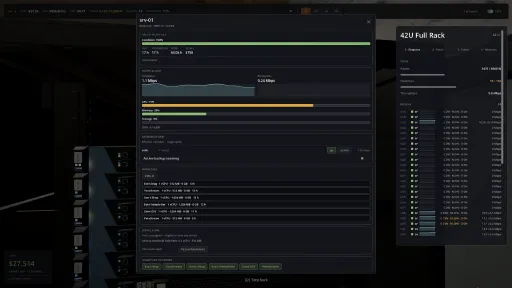
- The ops console is rebuilt. Every page is one laptop screen from the same parts: a status badge on each row, meters, a sentence saying what needs you, and the numbers behind it on Tab.
- Big fleets stay readable. Lists show 15 rows at a time in a stable order, search the whole roster by any word, and filter through dropdowns you can type into, each narrowing the others.
- Hosts show live CPU load and allocation separately. The meter is what workloads draw now. Allocated is the reserved share, which can pass 100% on an oversold server that is not yet contended.
- Host pools and networks have their own page. A host pool names who it serves and which service. Assign servers to it, and pin customers from the network's drawer or the customer's.
- Network reads your fabric, Internet reads your lines. Network's header is the traffic your servers carry, with fabric use and hot switches. Internet's header is line load against the ceiling your lines and routers set.
- Diagnose the whole site from Home or Incidents. An incident's own Diagnose opens the tenant it hits, or the site check when no tenant is named.
- The shop's cart is an order pad. One drawer holds the lines with prices, where the order lands, the total and Place order. Add leaves it closed, and the catalog scrolls under its tabs.
- Incidents open as steps. Find the cause, get the part when one failed, repair, recover. Each step lights when done and offers its one verb, with the timeline beside it.
Wall displays
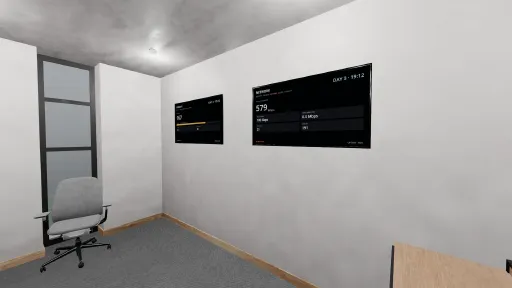
- The wall displays are rebuilt as six channels that fit the screen. Security, Finance, Network, Alerts, Capacity and a new Internet channel. Each is one figure, a meter and four instruments in the console's style.
- Network shows your fabric, Internet shows your lines. Network reads the traffic your servers carry, split north-south against east-west. Internet reads WAN out and in against your ceiling, lines, routers and attacks.
- The Alerts channel shows only whole rows. It shows as many incidents as fit its band, spread evenly, so the list never runs into the instruments below it.
Changed
- Yanking a cable takes a quarter-second hold. It was the two-second destructive hold. Tray and hook removal keep the long hold.
- Servers talk to each other more. Traffic between a tenant's own machines is now about half of everything your fabric carries, up from a third, so leaf and spine links fill sooner.
- The fleet traffic totals no longer jump. Total, north-south and east-west on the Network channel and the console header ease toward a new level over a few updates, so one burst no longer steps it.
- Carrier line throughput streams only while the console is open. Each line's traffic used to travel in every world update to every player. It now arrives only while a screen that shows it is up.
Fixed
- Opening a chat, a customer or the map no longer freezes the game. Each used to re-send the whole world and stall a tenth of a second. Now each sends a small update.
- A large campus no longer stutters four times a second. The game recounted the console's fleet totals every tick, console open or not. Now it waits for the console, and the server counts online hosts.
- A server still in your hands no longer counts as dark gear. The console's dark-gear count included unmounted machines, so a delivery in progress read as an outage.
- A router no longer sits idle for the life of your site. With few servers one of an equal pair carried nothing while its twin carried everything. Every tenant now takes its own path.
- A router's port to the security gateway shows the noise it forwards. It read idle on a router carrying no customer traffic, and its twin's port read high by the same amount.
- Storage rebalancing no longer runs on one clock. Every bucket burst together on one timer, so the fabric readout stepped up and back in rhythm. Each now bursts on its own schedule.
- A database on a server's workload list is named as one. Managed database rows read vm-30696, as if they were plain machines. Every row now carries its own kind and number.
- The migrate picker reads memory and disk in the unit you would say. It printed the raw megabyte count, so a large database read "1048576 MB RAM". It now reads "1 TB RAM".
- Setting an item down names the zone you know. The message printed an internal zone number, so on a campus it read "AZ 5" for the third building, as if the item had gone nowhere.
- Servers bought before v0.1.64 now match the shop card. The Memory 2U Dual, Memory 2U, Compute 2U Dual and Mainframe 7U you already owned kept their old cores, power, running cost or category.
Notes
- Every server you own carries its current spec on load, wherever it is. What you paid stays on the books, and a server too full for a smaller shape keeps its own.
- Outbound traffic re-balances across your routers once on load, and a tenant's path moves only when the tenant does. No hardware moves and nothing goes down.
- Your saves load. Saves from v0.1.64 and earlier come across unchanged.
- v0.1.64 cannot open a v0.1.65 save. Once a save has been loaded here, older builds refuse it.
- Client and server must both be on v0.1.65. The network protocol moved, so a v0.1.64 client is refused by a v0.1.65 server and the other way round.
- Two API fields are gone. `egress_gbps` and `ingress_gbps` on each carrier line under `edds`. The same numbers are on the metric stream as `edd:<id>:uplink:<n>:egress_gbps` and `edd:<id>:uplink:<n>:ingress_gbps`.
- One API field is new. `topbar.online_host_count`: the number of servers that are powered, up and reachable through a live line, the same test as each host's `online` flag.
- Thirteen more `topbar` fields are new, all fleet totals. `fabric_egress_gbps`, `fabric_ingress_gbps`, `north_south_gbps`, `contended_host_count`, `warm_host_count`, `fleet_mem_pct`, `fleet_disk_pct`, `busiest_host_id`, `busiest_host_load`, `busiest_host_label`, `racked_host_count`, `cable_count`, `failed_cable_count`.
Added
- Three customers who want memory, not cores. A scale-out database, a cache fleet whose nodes hold no disk, and an analytics tenant whose database needs more memory than any ordinary server holds.
- Three new servers. A Memory 1U, an ARM 1U Dual so a low-power fleet reaches past basic work, and an Everyday Dual for the gap between everyday and high-memory.
Changed
Servers
- Every server now sits where its name says. Compute boxes carry compute memory, everyday boxes carry everyday memory, and each dual-socket version carries a step more. No two servers are the same machine.
- The High-Memory Dual has twice the cores. It was 64 cores against 4 TB, so the memory could never be filled and the box sat half empty. Now 128, and the 4 TB is reachable.
- The low-power line grew. The ARM 2U doubles to 64 cores, and both ARM duals carry more memory, so a low-power fleet is no longer stuck serving only the simplest work.
- Five servers draw less power, three draw more. Draw follows what a box holds, so a compute server costs a rack much less than before and a memory server a little more.
- The everyday 2U costs what it holds. It carries half the memory it did and four terabytes of disk, and its price now reflects both rather than only its cores.
Customers
- No customer demands an uncontended processor any more. No real provider sells one, so the requirement is gone. How hard you oversell is yours alone to decide, on the one fleet dial.
- The fintech and core banking tenants ask for a private server instead. They pay for hardware nobody else touches, which is the thing a provider actually sells.
- A customer's page is five tabs instead of one long scroll. Health, their stuff, performance, money and messages, so what a tenant needs is a glance rather than a hunt.
- Customer requirements now say whether each one is met. Contract terms, service level and growth are separated, and every term carries a Met or Not met verdict instead of a symbol.
- Where a tenant runs now names the zone. Machines are grouped by zone, so a tenant spread across buildings no longer looks like one stacked in a single room.
- You can spread a tenant's copies out from its own page. The action sat only on the incident card, so choosing a fault isolation setting looked like it did nothing.
- A customer's message history fills its tab. It was a sixty pixel window inside a page-long scroll, showing about two messages at a time.
Shop
- The shop shows fewer spec columns on a narrow screen. The least useful columns drop off the right as room runs out, so the name, price and Add stay in view at any size.
- Shop descriptions use the room their page leaves spare. A page whose spec columns are narrow now gives that width to the description instead of leaving it blank.
Fixed
- Quitting to the title screen no longer crashes the game. The world left a pause-state hook behind when it closed, and the next tick from the server could run it against nothing.
- Confirming a two-tap action no longer crashes the game. Arming a host's Quit to title, a save deletion, or any click-again button left a timer running that could fire after the panel closed.
- Ordering from the shop no longer crashes the game. The Buy acknowledgement and the cart quantity box both left a timer behind that could outlive the page you set it on.
- The shop's price, buy buttons and cart no longer sit off the screen. They were clipped away on any window short of full width, so the shop often could not be bought from.
- Shop descriptions no longer print outside their row. The second and third lines fell through onto the row below, and the text was cut short even where there was room for it.
- Ops console pages no longer run off the right edge. Headline numbers, sub-tab strips and caption text wrap to fit, so nothing is cut away at any window size or interface scale.
- A customer's page fits whatever the tenant is called. Evict tenant, the performance charts and the message cards were pushed out of view by a long name.
- The mouse no longer sticks in the top-left corner. Above 100% interface scale, with a controller plugged in, the pointer pinned itself to the corner in menus.
- Touching the mouse takes control back from a controller. The pad steers the pointer only while you are using it, and a plugged-in pad no longer moves it on its own.
- Server info cards show the right specs. Nine listed the wrong cores, memory, disk or power. The everyday 1U and 2U, both large storage servers and the low-power 1U had never matched what you bought.
- Opening a customer with no incidents no longer shows the last one's. The list kept the previous customer's rows, so a healthy tenant looked like it had an open incident.
Notes
- Load once and your fleet is corrected. Servers that fit the new memory keep running untouched. Any that no longer fit are traded in, free, for a bigger one.
- Nothing is charged and no server loses cores. A trade-in always keeps the machine's core count and its rack height, so nothing you were running gets less processor than it had.
- Only three servers hold less memory than before. The Compute 1U and 2U and the Everyday 2U. Every other change adds memory or cores.
- Low-power servers you already own get bigger, free. The ARM 2U doubles its cores and memory and the ARM Dual doubles its memory. You keep what you paid, and the new size applies on load.
- A server keeps what you paid for it. Trading one in does not change its purchase price on your books.
- Your saves load. Saves from v0.1.63 and earlier come across.
- v0.1.63 cannot open a v0.1.64 save. Once a save has been loaded here, older builds refuse it.
- Scenarios still decide what you can own. An ARM-only run is never handed an x86 server, and a trade-in is refused outright if your site has not unlocked the replacement.
- The uncontended pool is removed from your save. The segment the game made for it goes on the same load, along with its network id, and any server pinned there rejoins the fleet.
- A tenant that needed a 1:1 processor now reads as needing a dedicated server. Open "cannot be served" incidents are relabelled on load, and clear themselves if they no longer apply.
- The Uncontended compute article has left the encyclopedia. Overselling CPU and Private servers cover what is left of the subject.
- Three API fields are gone. `requires_uncontended` on customers and prospects, and `uncontended_hosts_available` on prospects. Nothing replaces them, the requirement no longer exists.
Current Release
Build 25957697
Uploaded Oct 16, 2026
System Requirements
How to Install
Uptime.exe to play
Troubleshooting tips
• Run Redist/_CommonRedist installers if game won't start
• Add folder to Windows Defender exclusions
• Run as administrator
Download
Direct link available
Needed when extracting (WinRAR / 7-Zip) — not a site login.
You May Also Like
View All










Download Uptime: A Cloud Provider Sim for PC with a direct link or via torrent. Get the full version of Uptime: A Cloud Provider Sim for free. Uptime: A Cloud Provider Sim is a Indie released by RubyRack Games.